
 My Shelter Pro - Other Items
These other settings can also be controlled using My Shelter Pro.

To access this feature, select System/My Shelter Pro from the main menu.
File Cabinet Search Results Behavior
Interactive Refresh will cause the file cabinets to retrieve results as any of the file cabinet filters are modified. Notice there is no 'Get Results' button with interactive refresh as it's not needed. Results are returned when any of the filters are updated.
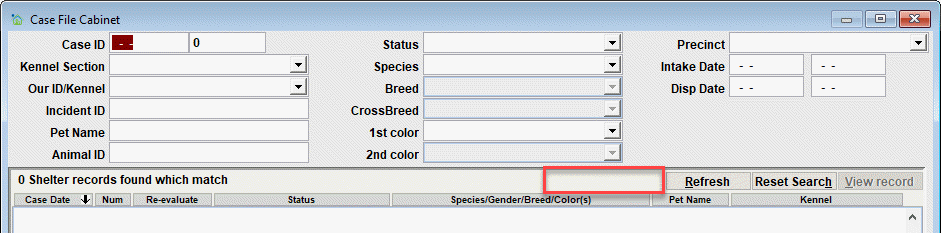
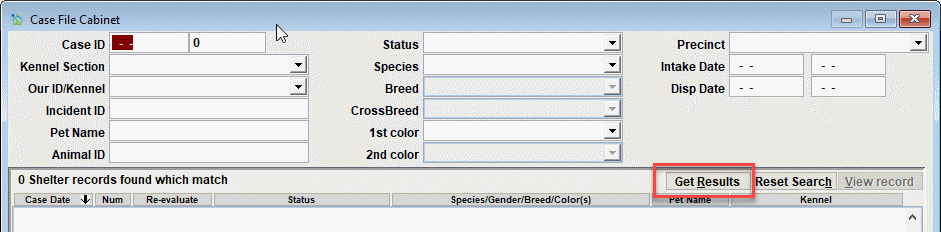
User Trigger Refresh will allow you to select multiple filters and then trigger the data refresh using the 'Get Result' button on the file cabinet window. Notice the 'Get Results' button which must be clicked after entering any/all filters. This button will trigger the data refresh using the filters as appropriate.
Note List Format
Detailed will cause note lists to show more detail about an attached note, such as note type, date, etc. The trade off is that less of the note narrative is visible on the event screen.

Short will simply show the note key and the rest of the line will show the narrative up to the available space in the list window. This allows room for more of the narrative to be visible.

Show list counts on tabs
No - list counts will not be updated/shown on the tabs.

Yes - list counts will be updated/shown when an event is first loaded. Notice the numbers in parentheses which are reflecting the number of records to be viewed on the tab. In this example there are 16 records to be seen under the 'Owner History' tab.

Comment or report problem with topic