
 Lost Animal Report - Creating a new lost report
Lost Animal Report - creating a new lost report
A lost animal report can be created in the following ways:
- With Shelter Pro Software by looking up a pet in a citizen's 'Animals Owned' list, and clicking the 'New Lost' button.
- With Shelter Pro Portal where the pet owner can self-create their own lost report by via their Shelter Pro Portal account.
Creating a lost report in Shelter Pro Software
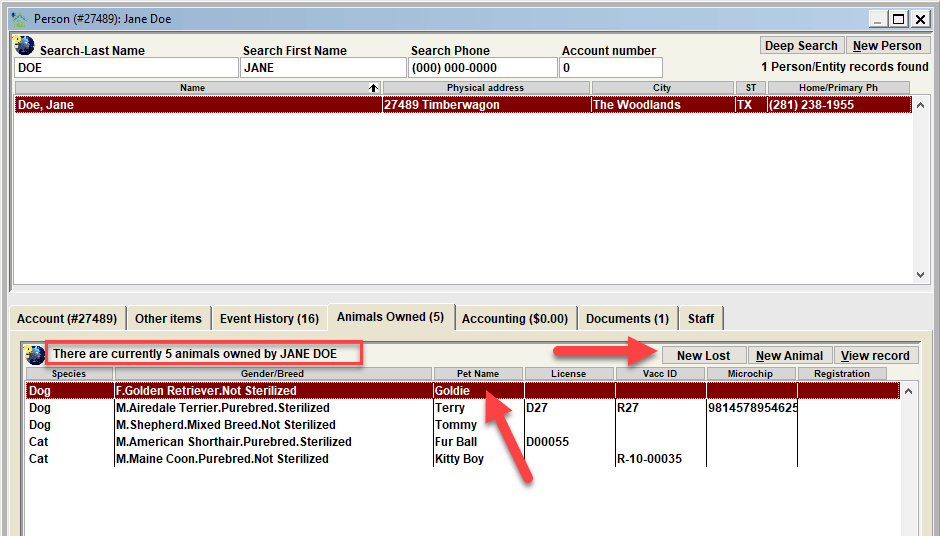
There are two requirements for a lost report to exist. First, a lost report requires that there be a owner of the lost animal (in other words, a person on the Person Database). Second, the animal must exist on the Animal Database and be designated as being 'Currently Owned' by the owner. With this in mind, to create a lost report follow these steps:
- Access the Person Database and lookup the owner. If the owner does not exist on the Person Database create a NEW person record to identify the owner and SAVE the newly created record.
- Click the 'Animals Owned' tab for the owner, and single-click the lost pet among the animals owned by the person. If the lost animal does not exist in the list, create a new animal record for the owner by clicking the NEW ANIMAL button.
- Click the NEW LOST button. After single-clicking the lost pet, click the NEW LOST button to create and save a new lost report for the selected animal.
Creating a lost report using Shelter Pro Portal
For customers who utilize Shelter Pro Portal with the 'transactional model', it is possible for an owner to self-create their pet's lost report via the owner's Shelter Pro Portal account. This method can be much more efficient and desirable as it places the responsibility for managing the lost report on the owner rather than the staff at the animal shelter. For more details, see About Shelter Pro Portal
Next Topic:
Comment or report problem with topic