
 Customize Email
Customize Email
It is possible to generate and send email from within Shelter Pro. Use this tab to tell Shelter Pro what email service your organization utilizes.
Tip - Once the email setup is complete, click Email to further understand how email is used within Shelter Pro.
Email using SMTP/POP3
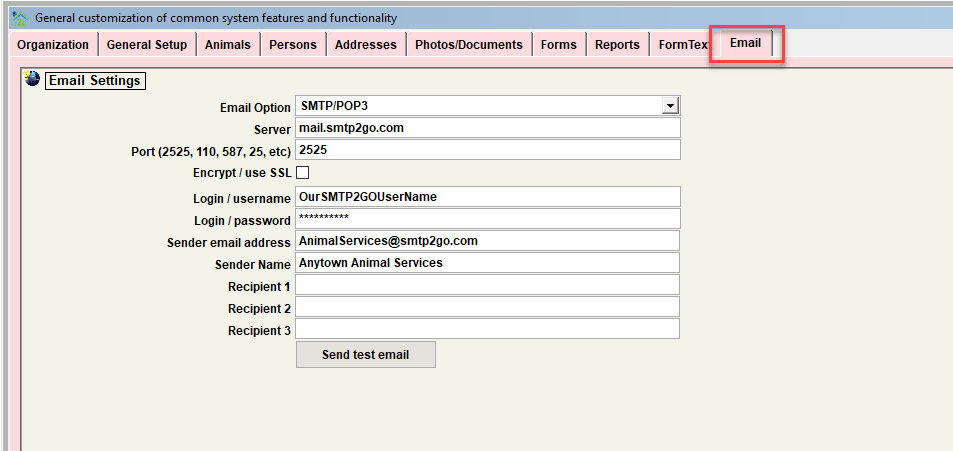
Email Option
Set to 'SMTP/POP3'.
Server
This is your SMTP/POP3 service provider's email server.
Port
Set to the port your SMTP/POP3 service provider requires.
Login/User Name
Set to the user name assigned by your SMTP/POP3 service provider.
Login/Password
Set to the password for your SMTP/POP3 account with the service provider.
Sender email address
When a recipient receives an email from your organization, this is the email address they will see as the 'sender'.
Sender name
When a recipient receives an email from your organization, this is the name of the sender. Typically this would be the same as your organization's name.
Send test email
Use this button to generate a test email and see if the email service is working as expected. The process will prompt for an email address which the test email will be sent to.
Email using Outlook
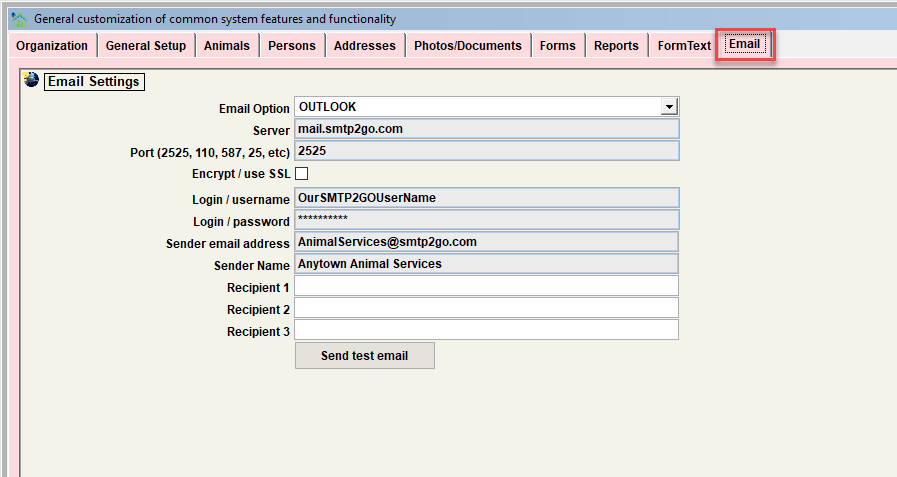
Email Option
Set to 'OUTLOOK'.
Server
Disregarded. Email credentials for the default outlook account will be used.
Port
Disregarded. Email credentials for the default outlook account will be used.
Login/User Name
Disregarded. Email credentials for the default outlook account will be used.
Login/Password
Disregarded. Email credentials for the default outlook account will be used.
Sender email address
Disregarded. Email credentials for the default outlook account will be used.
Sender name
Disregarded. Email credentials for the default outlook account will be used.
Send test email
Use this button to generate a test email and see if the email service is working as expected. The process will prompt for an email address which the test email will be sent to.
Next Topic
Comment or report problem with topic