
 Customize Partners
Shelter Pro has established partnerships with multiple other companies as a benefit for Shelter Pro's customers. This is done with the intention of making things easier for the user. For additional information about Shelter Pro's partnerships, visit: About Shelter Pro Partners. The following is a list of vendors that Shelter Pro has integrated with:
Microchip Provider Partnerships
- AKC/Reunite
- HomeAgain
- Petlink (Datamars)
- SmartTag
Pet Health Insurance Provider Partnerships
- Embrace Pet Insurance
Customize Partners Tab
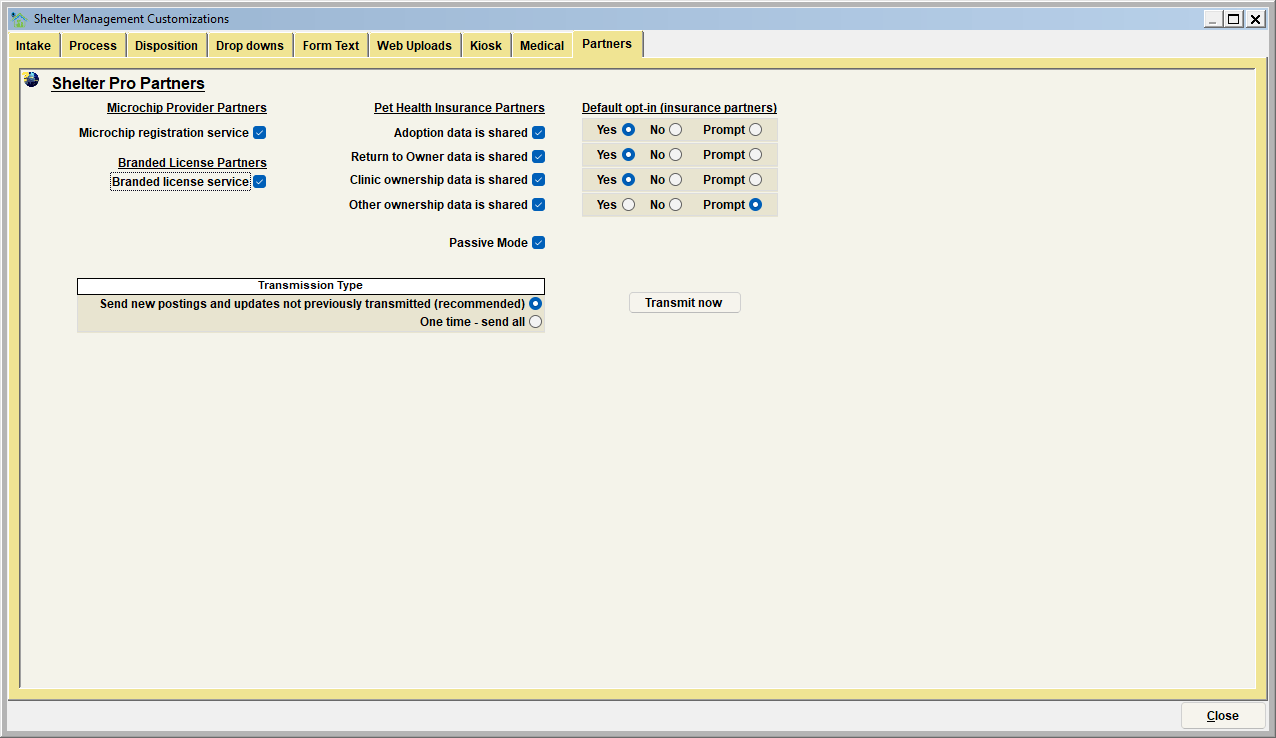
Microchip Provider Partners
Microchip Registration Services
- By checking this box, Shelter Pro will automatically compile animal and ownership information to be sent to microchip provider partnerships.
Branded License Partners
Branded License Service
- By checking this box, Shelter Pro will automatically compile animal and ownership information to be sent to branded license service providers.
Pet Health Insurance Partners:
Adoption Data is Shared
Selecting this box will have Shelter Pro will include new animal adoption and ownership information to be shared with Pet Health Insurance Partnerships.
Return to Owner Data is Shared
By checking this box, Shelter Pro will include return-to-owner data to be shared with Pet Health Insurance Partnerships.
Clinic Ownership Data is Shared
By checking this box, Shelter Pro will include clinic ownership data to be shared with Pet Health Insurance Partnerships.
Other Ownership Data is Shared
By checking this box, Shelter Pro will include other animal ownership data to be shared with Pet Health Insurance Partnerships.
Default Opt-In (Insurance Partners)
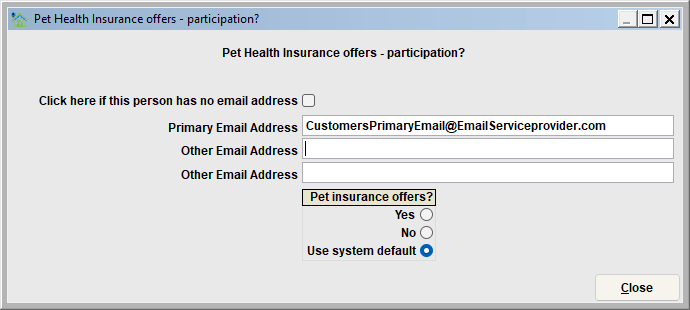
Each of the above Pet Health Insurance data that is selected to be shared has the default opt-in options: Yes, No, and Prompt. If "Yes" is selected, when an animal is adopted, Shelter Pro will prompt the Organization Employee to ask if the Customer wants to provide an email address to be sent to Pet Insurance Partners. If "No is selected," Shelter Pro will not ask for the email address.
Date Transmitted
The following data (if available) will be transmitted to the selected partners;
- ID Type (HomeAgain, Petlink, SmartTag, Pet Insurance, etc.)
- ID Effective Date
- ID Expiration Date
- Owner's Full Name (First, Middle, Last)
- Owner's Address (Street Number, Street Name, City, State, Postal Number, Country)
- Owner's Email (Primary, Second, Third)
- Owner's Phone Numbers (Home, Work, Third)
- Pet Name
- Pet Species
- Pet Primary Breed
- Pet Cross-Breed
- Pet Gender
- Pet Sterilization
- Pet Primary and Secondary Colors
- Pet Coat
- Pet Fur Pattern
- Pet Tail
- Pet Date of Birth
- Pet Size Category
- Pet Age
- Pet Declawed Status
- Pet Status
- Organization Name
- Organization Address (Street Number, Street Name, City, State, Postal Number, Country)
- Organization Phone Number
- Pet Photograph
Passive Mode
Having this check box selected will enable a passive FTP (File Transfer Protocol) to the Shelter Pro server.
Transmission Type
Send New Postings and Updates Not Previously Transmitted (Recommended) By selecting this option, Shelter Pro will send new postings and updates relating to the previously selected Microchip Registration Services Data, Branded License Service Data, and/or Pet Health Insurance Provider Data that were not previously transmitted. The frequency that the data will be transmitted is customizable within the Customize Automation Mode.
One Time - Send All By selecting this option, the user can manually transmit any of the previously selected Microchip Registration Services Data, Branded License Service Data, and/or Pet Health Insurance Provider Data. Keep in mind that all data, previously transmitted or not, will be transmitted to the Shelter Pro Partners when the "Transmit Now" button is clicked.
Transmit Now
Clicking this button will manually transmit the data to the Shelter Pro server.
Next Topic
Customize - Animal Identification module
Comment or report problem with topic