
 Customize Drop downs (Shelter Management)
Customize Drop Down Tab (Shelter Management)
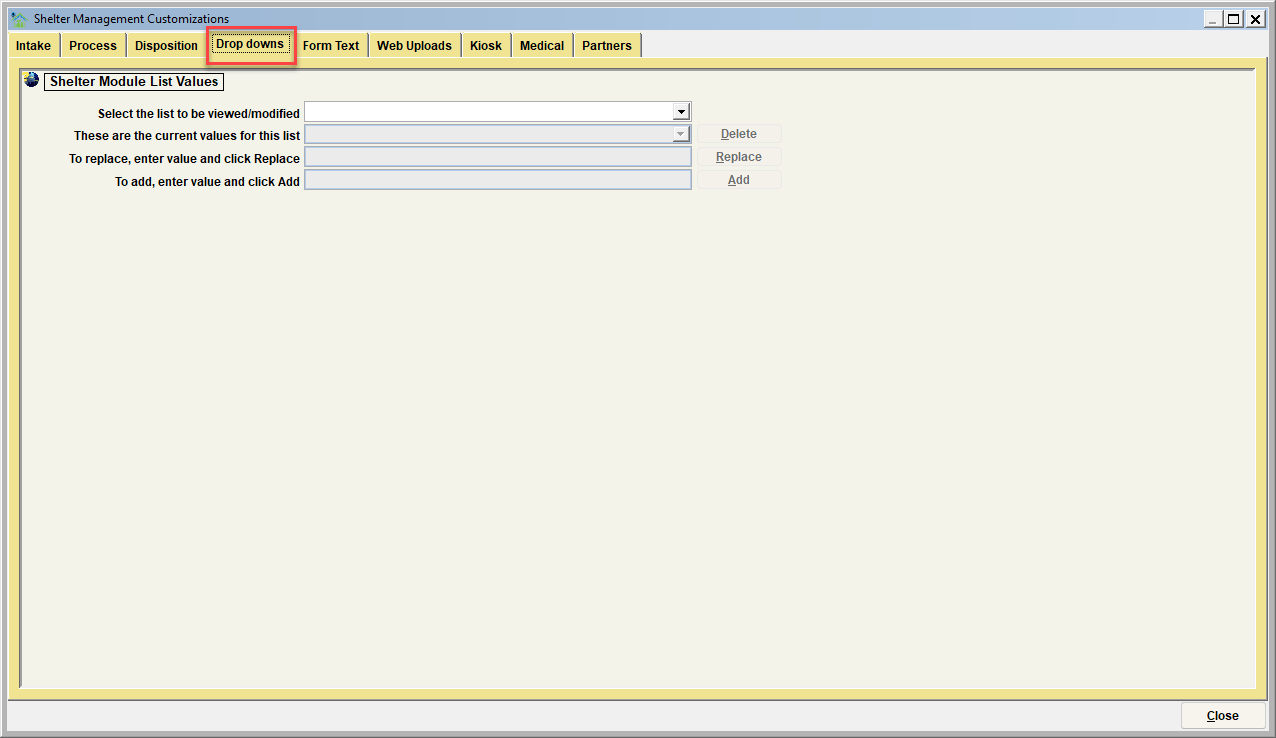
The Drop Downs tab is where the dropdown lists associated with case processing can be modified. You can delete, replace, or add values. Follow the instructions on the screen to do each of these functions.
The specific lists which can be modified include:
| List to be modified | Description |
|---|---|
| BITECASE_STATUS | Status of new bite case (Open, Closed, Sent to Lab, etc) |
| BITECASE_TESTTYPE | Test type requested when sent to lab (Rabies, Listeriosis, Mastitis, etc) |
| BITECASE_TESTMETHOD | Method used for testing (DFA, Quarantine, etc) |
| BITECASE_TESTRESULT | Results from the bite case test (Positive, Negative, Unfounded, etc) |
| CASE_CONDITION | Condition of animal upon Case Intake |
| CASE_DISPOSITION | Disposition methods (adopted, return to owner, etc) |
| CASE_REASON | Case Intake reason (stray, unwanted, etc) |
| CASE_STATUS | Current Case Status (holding, adoption available, etc) |
| CASE_TRANSPORT | How the animal arrived (ACO pickup, owner turn-in, etc) |
| COLLAR_TYPE | Animal's Collar description |
| COLOR_COLLAR | Animal's Collar color |
| KENNEL_SECTION | Kennel section designation specified to the Organization, for example "Dog/Cat holding, Quarantine, Adoption,etc." The individual kennels within the selected kennel section are also customizable, See "KENNEL_"______" |
| KENNEL_"______" | The individual kennel labels within a Kennel Section are customizable. When a Kennel Section is created, it will create a new sub-section in the dropdown. For example, if a new kennel section is created labeled as "CAT_HOLDING", the dropdown sub-section will show KENNEL_CAT_HOLDING. |
| MICROCHIP_TYPE | Microchip types implanted |
| PRECINCT | Geographic areas where animals are impounded from |
| NOTE_TYPE_CASE | The type of note that can be entered in the animal's case view |
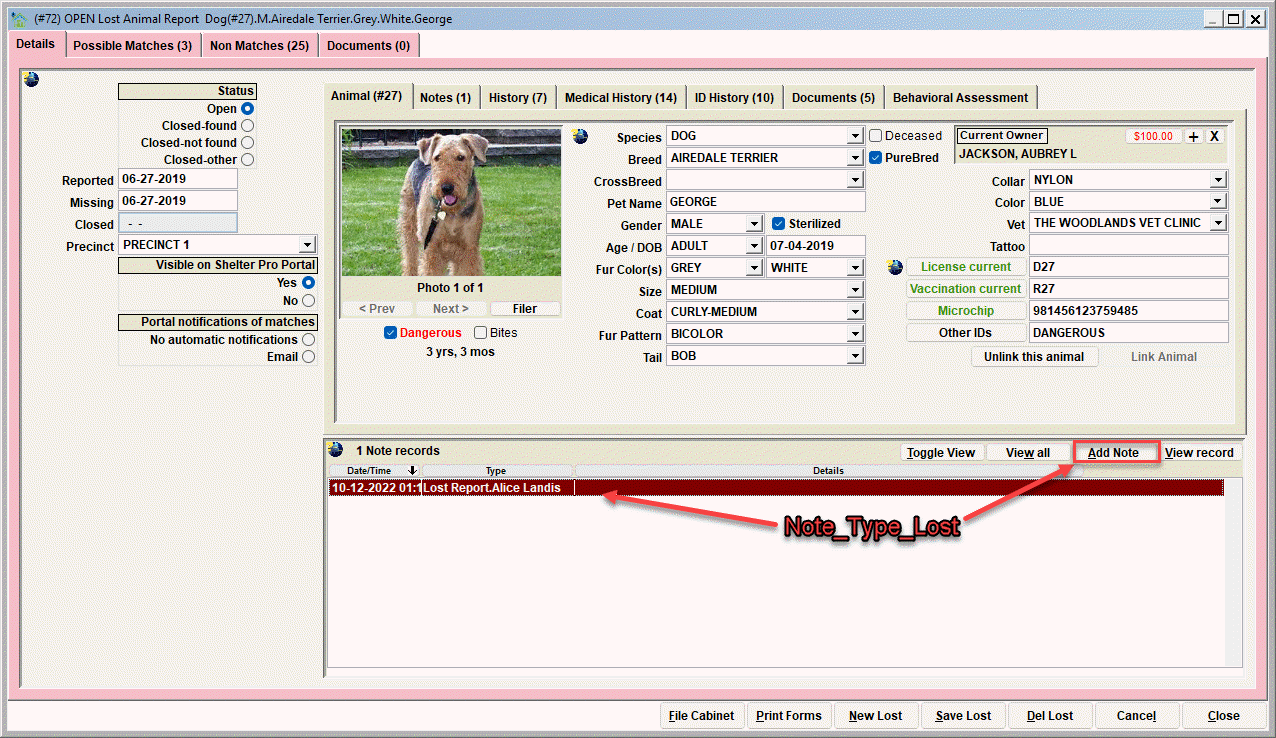
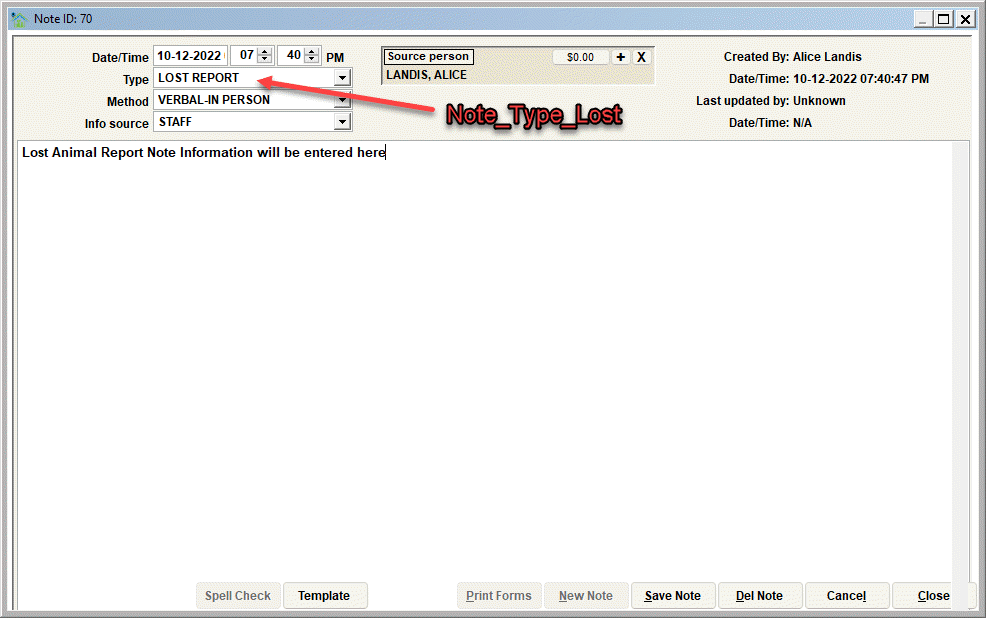
| NOTE_TYPE_LOST | The type of note that can be entered in the lost animal view |
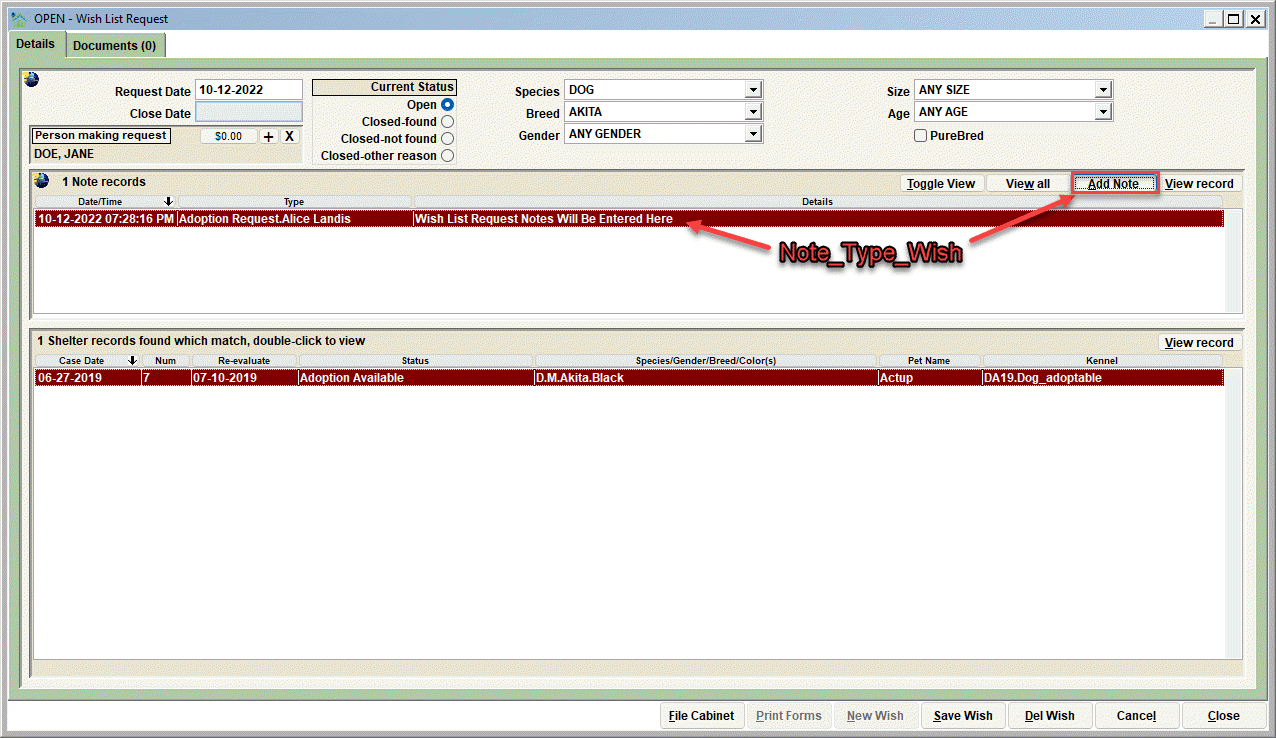
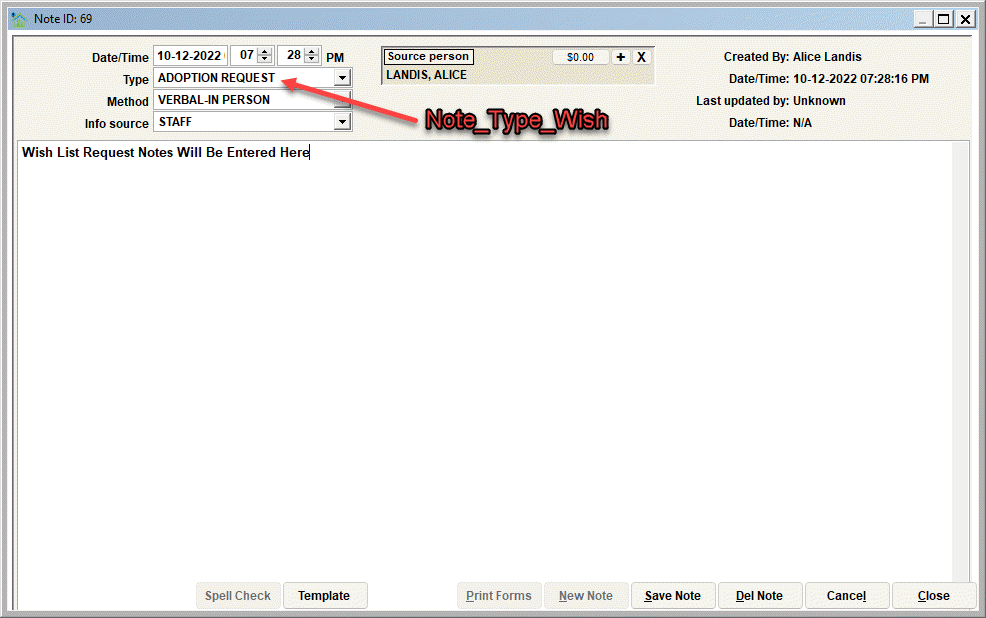
| NOTE_TYPE_WISH | The type of note that can be entered in the wish list request view |
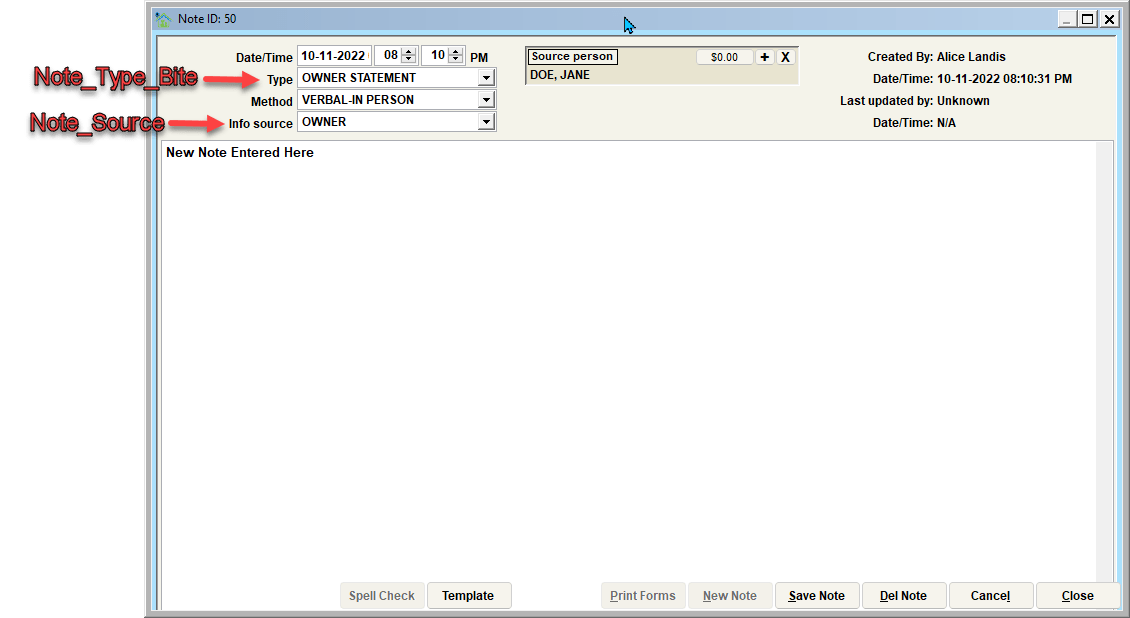
| NOTE_TYPE_BITE | The type of note that can be entered in the bite case view |
| NOTE_SOURCE | The source of the information obtained that is entered in the note area |
| LOST_MATCH_ASSESSMENT | Comparison between selected animal and lost animal report. |
Important: Some list values in Shelter Pro cannot be altered in any way. Protecting certain values is necessary because if they were to be altered, then basic functionality within Shelter Pro would be jeopardized. A simple example of this is the species value of DOG. If you select the protected value, you will see a message stating:
"Important: this value is reserved, it cannot be deleted or replaced."

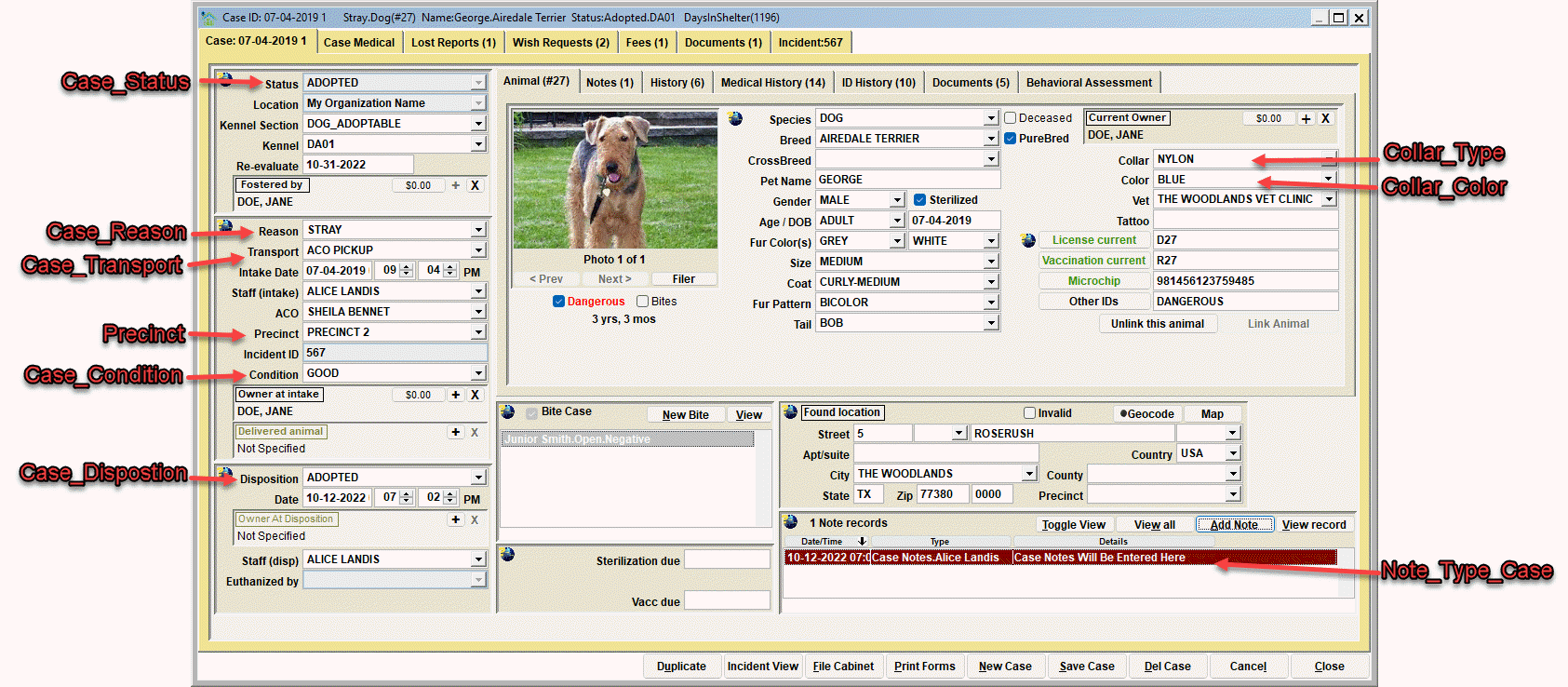
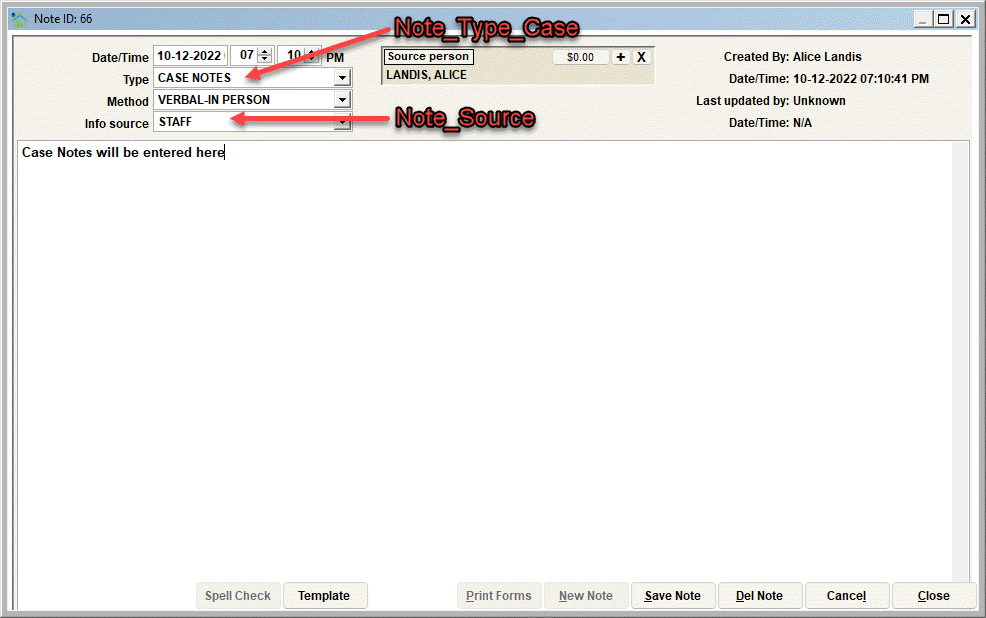
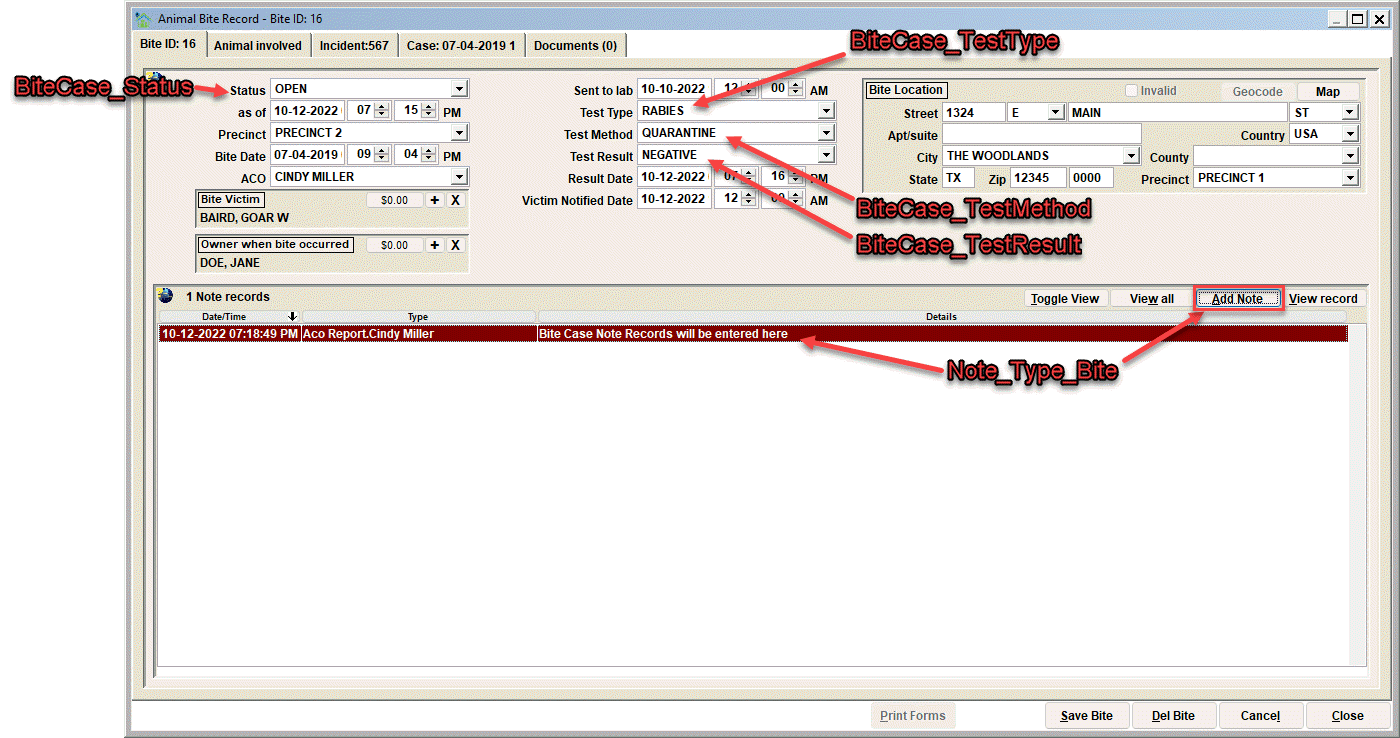
Visualizing the various lists changes
Next Topic
Customize Form Text (Shelter Management)# Customize Drop Down Tab (Shelter Management)
The Drop Downs tab is where the dropdown lists associated with case processing can be modified. You can delete, replace, or add values. Follow the instructions on the screen to do each of these functions.
The specific lists which can be modified include:
| List to be modified | Description |
|---|---|
| BITECASE_STATUS | Status of new bite case (Open, Closed, Sent to Lab, etc.) |
| BITECASE_TESTTYPE | Test type requested when sent to the lab (Rabies, Listeriosis, Mastitis, etc.) |
| BITECASE_TESTMETHOD | Method used for testing (DFA, Quarantine, etc.) |
| BITECASE_TESTRESULT | Results from the bite case test (Positive, Negative, Unfounded, etc.) |
| CASE_CONDITION | Condition of animal upon Case Intake |
| CASE_DISPOSITION | Disposition methods (adopted, return to owner, etc.) |
| CASE_REASON | Case Intake reason (stray, unwanted, etc.) |
| CASE_STATUS | Current Case Status (holding, adoption available, etc.) |
| CASE_TRANSPORT | How the animal arrived (ACO pickup, owner turn-in, etc.) |
| COLLAR_TYPE | Animal's Collar description |
| COLOR_COLLAR | Animal's Collar color |
| KENNEL_SECTION | Kennel section designation specified to the Organization, for example, "Dog/Cat holding, Quarantine, Adoption, etc." The individual kennels within the selected kennel section are also customizable, See "Kennel_"______" |
| KENNEL_"______" | The individual kennel labels within a Kennel Section are customizable. When a Kennel Section is created, it will create a new sub-section in the dropdown. For example, if a new kennel section is created labeled as "Cat Holding", the dropdown sub-section will show KENNEL Cat Holding. |
| MICROCHIP_TYPE | Microchip types implanted |
| PRECINCT | Geographic areas where animals are impounded from |
| NOTE_TYPE_CASE | The type of note that can be entered in the animal's case view |
| NOTE_TYPE_LOST | The type of note that can be entered in the lost animal view |
| NOTE_TYPE_WISH | The type of note that can be entered in the wish list request view |
| NOTE_TYPE_BITE | The type of note that can be entered in the bite case view |
| NOTE_SOURCE | The source of the information obtained that is entered in the note area |
| LOST_MATCH_ASSESSMENT | Comparison between selected animal and lost animal report. |
Important: Some list values in Shelter Pro cannot be altered in any way. Protecting certain values is necessary because if they were to be altered, then basic functionality within Shelter Pro would be jeopardized. A simple example of this is the species value of DOG. If you select the protected value, you will see a message stating:
"Important: this value is reserved, it cannot be deleted or replaced."
Visualizing the various lists changes
Next Topic
Customize Form Text (Shelter Management)
Comment or report problem with topic