
 Vaccination View - Details
Vaccination View - Details
The vaccination view shows the details of a vaccination record.
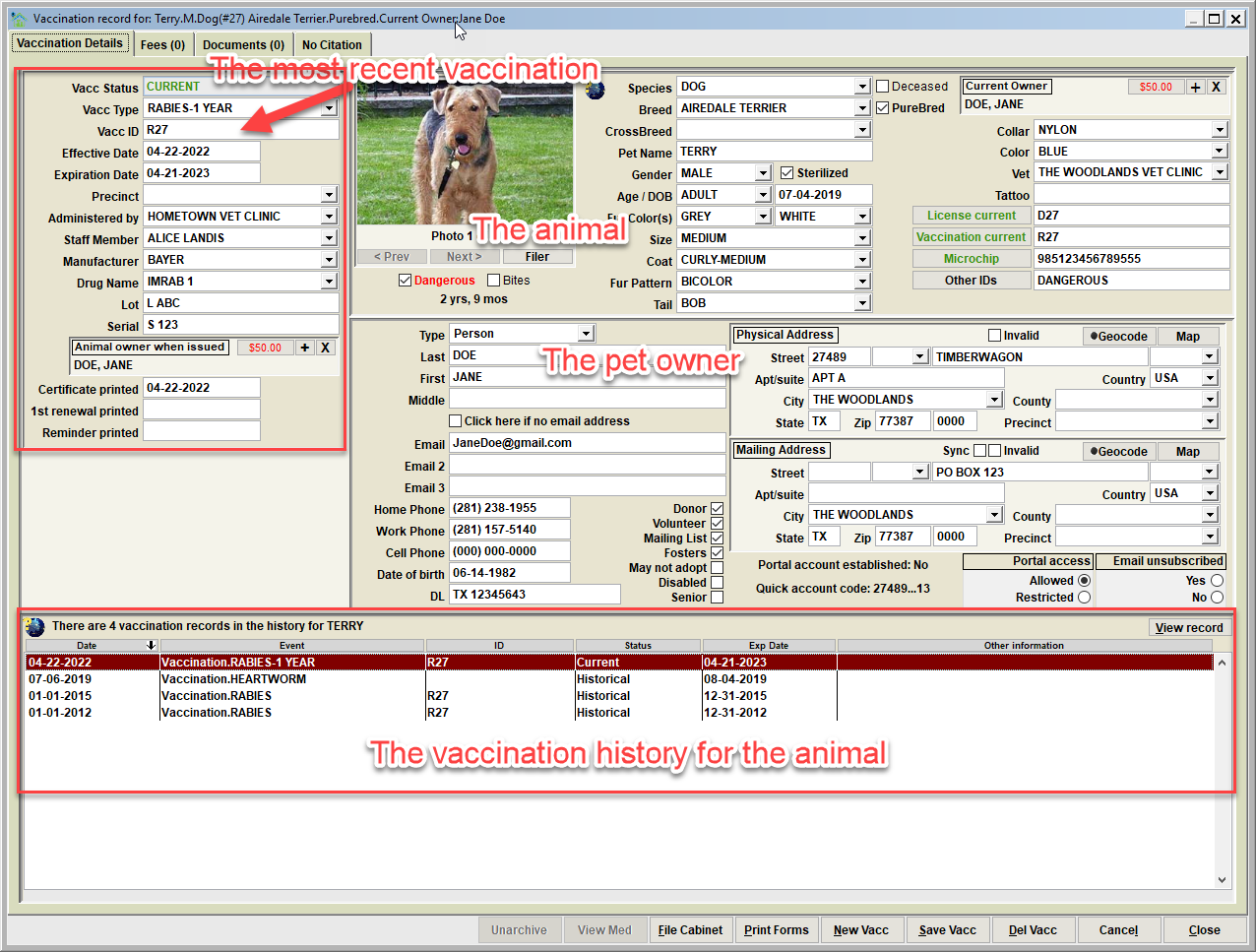
The Vaccination
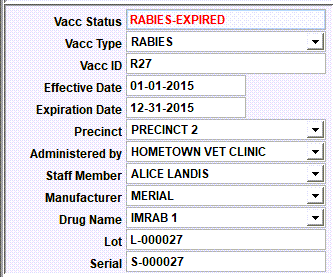
The data elements of a vaccination include the following:
• Vacc Status – the current status of the record.
Tip: The status values will show as:
* CURRENT - if the expiration is on or after the current date.
* EXPIRED - if the expiration is before the current date and the record is the 'most recent' for the animal.
* HISTORICAL - if the expiration date is before the current date AND the record is not the 'most recent' for the animal.
* DECEASED - if the animal's deceased indicator is checked.
• Vacc Type – the 'type' of vaccination that was current at the time of the posting. For pet licensing purposes, this is most common a form of rabies vaccination.
• Vacc ID – this is typically the 'rabies certificate ID' that was given to the pet owner when the rabies vaccination was provided by a vet. This data element may or may not be required depending on your organization's specific requirements. • Effective Date and Expiration Date - the date of vaccination, and date of expiration upon which a 'booster' vaccine would become due.
• Precinct – the precinct under which this record is associated. This may or may not be a required element depending on your organizations specific requirements.
• Administered By – The list of agencies/persons in this list is determined by the person records on the Person Database who have the 'Vaccination Issuer', or 'Veterinarian', or 'Vet Clinic' switch checked. This would typically represent third-party entities who provide pet vaccinations, in particular rabies vaccinations. Most often these are vets.
• Staff Member – this is the employee who recorded the record.
• Cert Printed – this is the date that a certificate was printed. Note that this can be auto-set when a certificate is printed via PRINT FORMS or BATCH FORMS (via the Animal IDs File Cabinet).
• 1st renewal – this is the date that a renewal reminder was printed. Note that this can be auto-set when a reminder is printed via PRINT FORMS or BATCH FORMS (via the Animal IDs File Cabinet).
• Last reminder – this is the date that a late reminder was printed. Note that this can be auto-set when a reminder is printed via PRINT FORMS or BATCH FORMS (via the Animal IDs File Cabinet).
• Animal Owner When Issued – this is (or was) the animal's current owner at the time the record was created.
The Pet Owner / The Animal
This is the current owner information, and animal profile information. These data elements can be updated directly on this view without having to go to the Person Database or the Animal Database.
Vaccination History
The list at the bottom of the view will show any previous/historical records that exist for the animal.

Next Topic
Comment or report problem with topic