
 File Cabinets
File Cabinets
Each event type includes its own File Cabinet. File cabinets are the "search and retrieve" tool you'll use to look up and retrieve records. For instance, to look up a previously recorded incident, use the Incident File Cabinet under the Animal Control Module main menu.
VERY IMPORTANT LEARNING
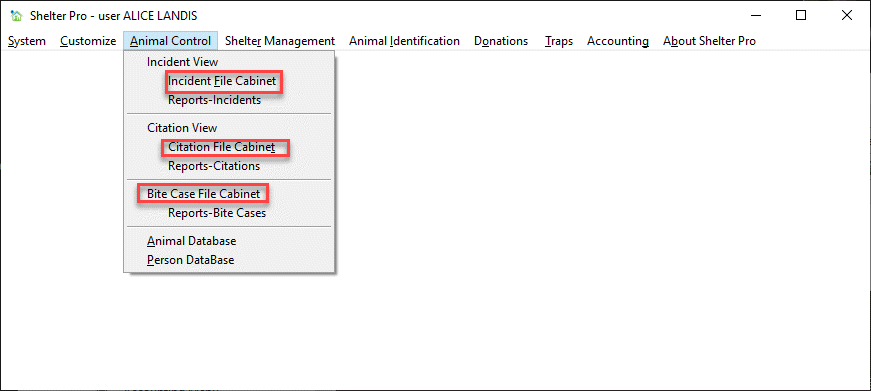
Each of the event types have their own file cabinet. The two samples below highlight the Animal Control Module and Shelter Management Module menus. All the other modules (Animal IDs, Donations, Traps, Accounting) have their own file cabinets. As you are navigating the menus, you'll quickly notice the term 'file cabinet' is very common.
Take a look at this sample for The Animal Control Module:
Similarly, use the File Cabinets under the Shelter Management Module main menu to search and retrieve previously entered shelter management records.
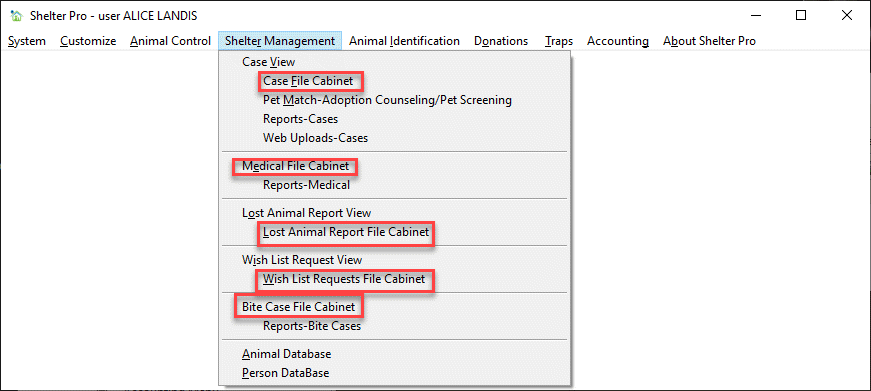
Here is a list of the File Cabinets built into Shelter Pro
| Event Type | File Cabinet | Lookup Usage |
|---|---|---|
| Incident | Incident File Cabinet | Animal Control Incident records |
| Citation | Citation File Cabinet | Animal Control Citation records |
| Bite Case | Bite Case File Cabinet | Bite Case records |
| Case | Case File Cabinet | Shelter Case records |
| Medical | Medical File Cabinet | Shelter Medical records |
| Lost Reports | Lost Animal Report File Cabinet | Lost Animal reports |
| Wish List | Wish List Request File Cabinet | Shelter Wish List records |
| Animal IDs | Animal IDs File Cabinet | Animal Identification records |
| Donations | Donations File Cabinet | Donation records |
| Traps | Traps File Cabinet | Trap usage/rental records |
| Charges (fees) | Charge File Cabinet | Charge/Fee records |
| Payments | Payment File Cabinet | Payment records |
| Deposits | Deposit File Cabinet | Deposit records |
Accessing a File Cabinet from an event view
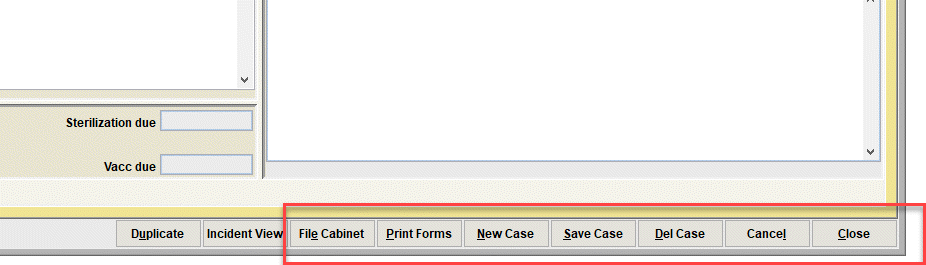
For easy access to an event types file cabinet without exiting back to the main menu, file cabinets can also be accessed from any of the primary event screens. Note the File Cabinet button among the various command buttons on this sample from the Shelter Management Case View:
Next Topic
Comment or report problem with topic