
 Person Record - Documents
Person Record - Documents
The Documents tab shows any images or files associated with the individual.
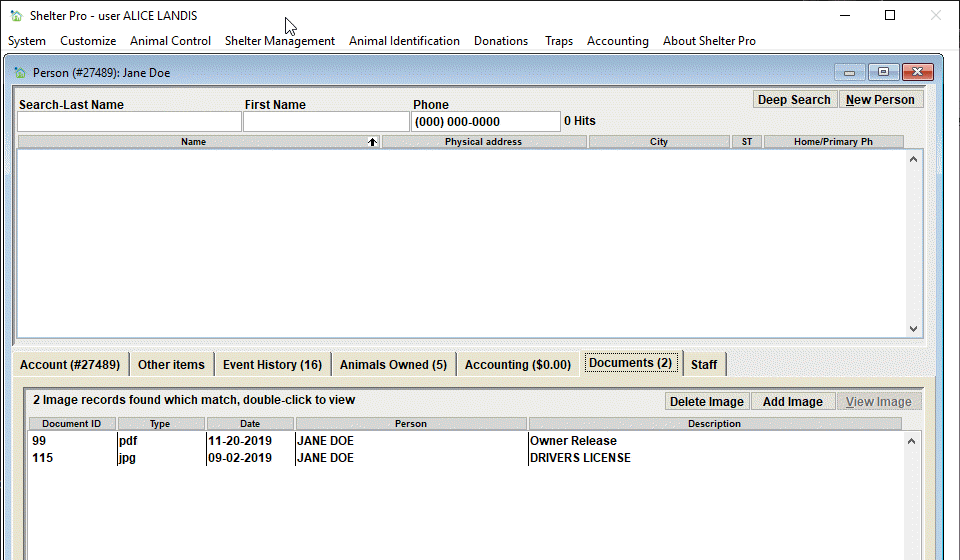
The list
We can see Jane's documents includes two items. The columns in this view are:
- Document ID - This is the internal record key assigned by Shelter Pro for the stored image/file.
- Type - The document file type (jpg, pdf, doc, xls, etc.).
- Date - The date the image/file was added to the database.
- Person - The person or organization the image/file is associated with.
- Description - A description of the image/file.
Tip - To open and view a document, simply double-click the list item and the image will be opened.
The 'Delete Image' button

Use this button to delete an document image from the database.
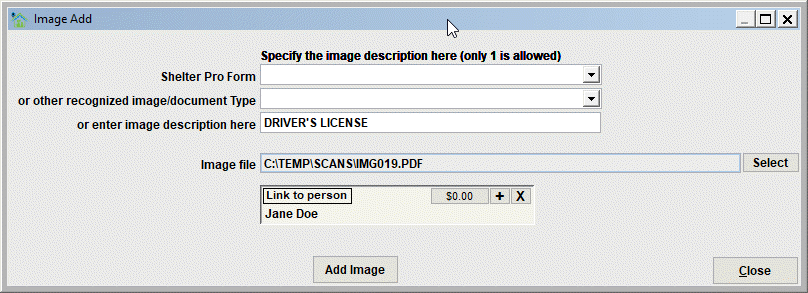
The 'Add Image' button

Use this button to add a new document/image to the database. The new file will automatically be associated to the person. When clicked, the Add Image window will appear where you can select and describe the new document.
Next Topic
Comment or report problem with topic