
 Case View - Current Status Examples
Case View - Current Status Examples
The following are current status examples within The Shelter Management Module under Case View Details. While these examples are very common, there is the potential for their to be other options that have been 'customized' in your organization's Shelter Pro.
Holding
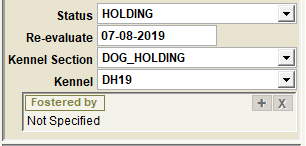
The status of HOLDING is common when a STRAY animal is received and is kept during a 'holding period'. When this status is selected, the re-evaluation date will be automatically set to the current date plus the preset 'holding period days' defined under 'customize'. Common practice is that when the re-evaluation date is reached, the pet will be re-evaluated and its current status will most likely change due to the holding period being completed.
IMPORTANT
See the Case File Cabinet 'Status' search to list all animals with a current status of HOLDING. There is also a status search labeled EVALUATION DUE which will find all open cases where the re-evaluate date has been reached or is overdue. Use Reports-Cases to generate a report titled 'Evaluation Due List' which will print all cases where the re-evaluate date has been reached or is overdue.
Adoption Available
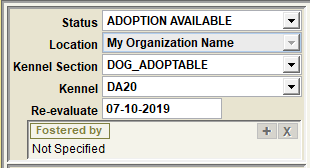
ADOPTION AVAILABLE is used when a pet is available to be adopted. When this status is selected, the re-evaluation date will be automatically set to the current date plus the preset 'adoption available days' defined under 'customize'.
IMPORTANT
See the Case File Cabinet 'Status' search to list all animals with a current status of ADOPTION AVAILABLE. Use Reports-Cases to generate a report titled 'Adoption Available List' which will print all cases with a current status of ADOPTION AVAILABLE.
PETS ON THE WEB
When a pet's status is ADOPTION AVAILABLE, the pet will automatically become visible on Shelter Pro Portal's 'adoptable' pets listing. The pet will also be transmitted to Petfinder and Adopt-A-Pet for posting to their respective websites. This assumes your organization is using each of these available features.
Fostered
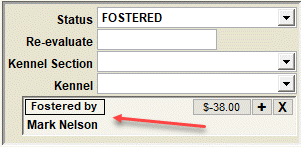
FOSTERED is used when a pet is available to be adopted, however the pet is not kept at the facility. Rather the pet is temporarily housed with a foster person or family. Typically there is no kennel assignment because the animal is not being held at a shelter. In this example, the pet is being Fostered By Mark Nelson.
Holding - Citizen Home
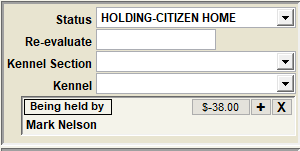
HOLDING - CITIZEN HOME is used when a FOUND pet is known to the shelter, however the pet is not kept at the facility. Rather the pet is temporarily being kept at a citizen's home with the intention of re-uniting the pet when the owner is located. Typically there is no kennel assignment because the animal is not being held at a shelter. In this example, the pet is being Being held by Mark Nelson.
Pending Medical Exam
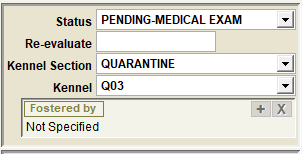
PENDING MEDICAL EXAM is used when a pet is awaiting a medical check for some reason. This might be applicable when a pet is pre-adoption available and procedure is to perform a medical exam before moving the pet to ADOPTION AVAILABLE status. However, there may be other scenarios where PENDING MEDICAL EXAM is used.
IMPORTANT
See the Case File Cabinet 'Status' search to list all animals with a current status of PENDING MEDICAL EXAM. A common scenario might be that an onsite vet or vet tech might use this to find all shelter pets in this status and proceed with medical related activities for each pet.
Next Topic:
Comment or report problem with topic