
 Case View - Adding a medical item
Case View - Adding a medical item
Adding detailed medical items to a medical visit can be done in two ways, via quick picks, and via buttons.
Adding medical items using the quick picks
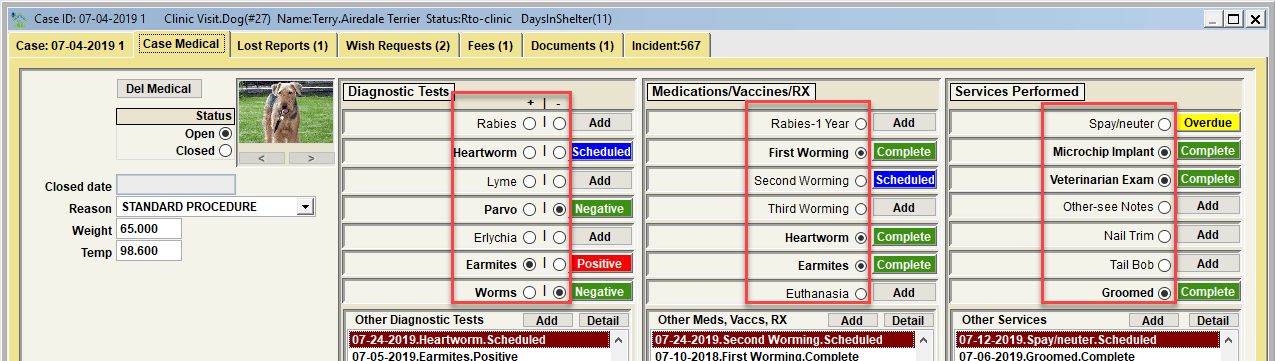
Adding detailed medical items to a medical visit can be done using the defined 'quick picks'. In this sample, note the various bullets for items under Diagnostics Tests, Medications/Vaccines/RX, and Services Performed. Clicking on any of these bullets will cause a new detailed record to be posted for the item with one-click. Hence the name 'quick pick'.
The 'details' are still captured for each quick pick item added. Data elements like the date administered, user, completed status, etc are there. To see those details, click the button to the right of the quick pick.
The quick picks are variable based on the species of the linked animal. The quicks displayed for a dog will be different than those displayed for a cat, or a horse, etc. Quick picks and other medical related items can be customized via CUSTOMIZE/SHELTER MANAGEMENT/MEDICAL.
Adding medical items using the buttons
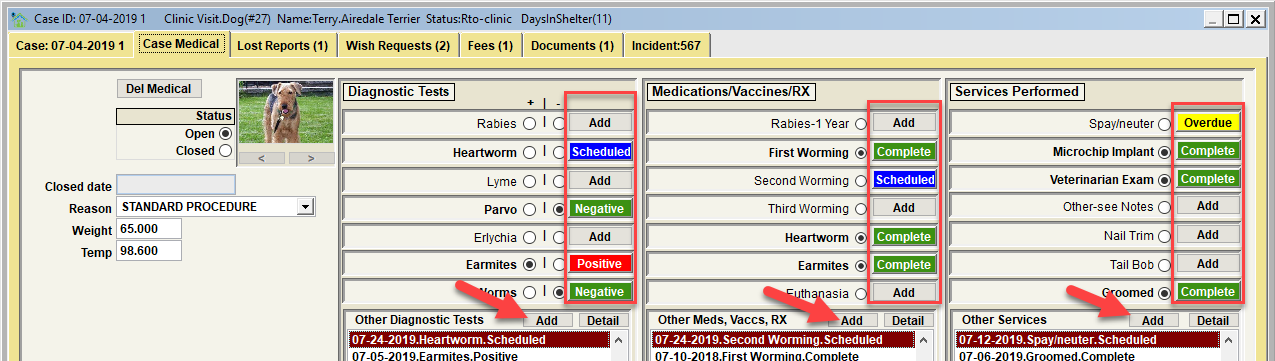
Adding detailed medical items to a medical visit can be done using the defined buttons which will be labeled 'Add' if the particular medical detail record does not yet exist. In this sample, note the various 'Add' buttons for items under Diagnostics Tests, Medications/Vaccines/RX, and Service Performed. Clicking on any of these buttons will cause a new detailed record to be posted, and the record will be displayed for the item so that further details can be viewed and modified as appropriate.
Be sure to notice the 3 extra 'Add' buttons in the lists below the quick picks. These are used to add other medical detail record for items that are done, but the item is not a quick pick. When the detailed record is displayed, the specific medical item must be selected from a drop down list on the view. Also, other details be be viewed and modified as appropriate.
Next Topic
Comment or report problem with topic