
 Case View - Follow ups
Case View - Follow ups
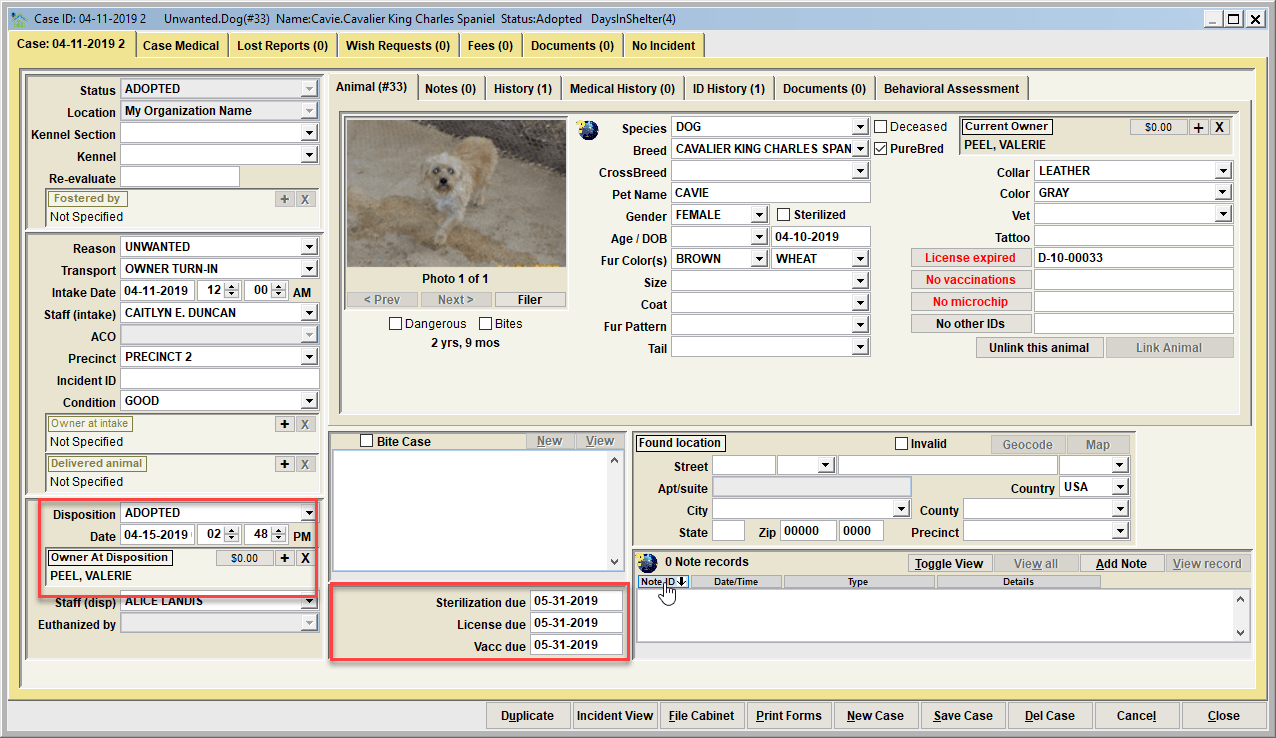
Shelter Pro tracks three optional follow-up dates when a case has become closed (e.g. ADOPTED). Each is a date that the owner has agreed to have gotten the items completed for the pet. Tracking of each of these is optional and may not enabled on your Shelter Pro. Note that enabling these is done via CUSTOMIZE/SHELTER MANAGEMENT/DISPOSITION. The three follow-ups include:
- getting the pet sterilized (aka altered);
- getting the pet licensed;
- getting the pet vaccinated.
To create a follow-up, enter a date (typically a future date) indicating when the owner is responsible for having the particular item completed.
Closing a follow-up
When an owner has performed an agreed follow-up, clear the follow-up date and update the appropriate data elements indicating the follow-up was completed.
For example, if the owner had a follow-up to get a pet sterilized, when the owner provides proof of sterilization the following steps should be completed:
- Access the case record;
- Mark the animal's sterilized check box;
- Clear the 'Sterilization Due' follow-up date so the follow up will no longer show up when searching for outstanding follow-ups.
Tip - Use the Case File Cabinet to find due/overdue follow-ups
See the Case File Cabinet 'Status' search to list animals with an outstanding follow-up(s). The status selections include:* FOLLOW-UP SPAY/NEUTER DUE; FOLLOW-UP VACCINATION DUE; FOLLOW-UP LICENSE DUE; FOLLOW-UP DUE-ANY REASON.
Tip - Generate a report of follow-ups due
See REPORTS-CASES under Shelter Management. Run the 'Dispositioned - Follow ups overdue' report to get a listing of all due/overdue follow-ups along with supporting information.
Next Topic:
Comment or report problem with topic