
 Lost Animal Report
Lost Animal Report View
This is a sample of a Lost Animal Report. Notice the following:
- The lost report is linked to a specific animal on the animal database. The sample shows the lost animal to be Terry, an Airedale Terrier.
- The animal has a known 'Current Owner'. The Current Owner is Jane Doe.
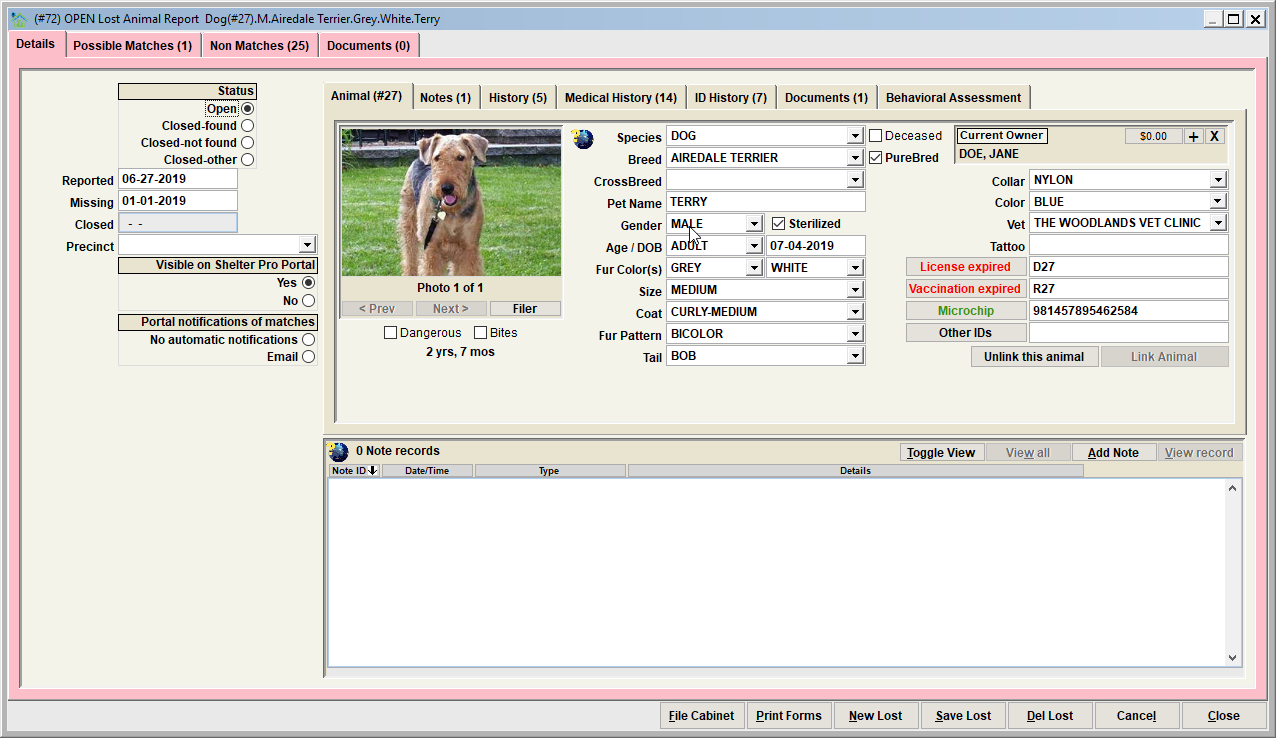
Data elements of a lost animal report
Beyond the linked animal and known current owner, a lost report will have the following data elements.
• Status – the importance of the status is if the lost report has been intentionally posted as open or closed. Note that closing a lost report will disable the automatic monitoring of the lost report comparisons to shelter case pets. In other words, closed means that Shelter Pro stops looking for the pet among the sheltered pet population processed by the shelter.
There is an option in Shelter Pro to have lost reports automatically expire after a set number of days. This is a customization setting for the Shelter Management module. If an open lost report has expired, you would see 'AUTOMATICALLY EXPIRED' in the title of the Lost Animal Report View.
• Reported – this is day that the lost report became active. Typically this would be the day the lost report was received from the owner.
• Missing – this is day that the animal went missing. This can be different than the reported date. Any shelter case animal that has an intake date before this date will be considered a non-match.
• Closed – this is day that the lost report was closed and active monitoring was disabled.
• Precinct – this is precinct the animal is associated with. Typically this would be the precint where the pet owner resides. If specified, any shelter cases with a non-blank precinct that does not match this precinct will be considered a non-match.
• Visible on Shelter Pro Portal – with Shelter Pro Portal, there is an option to have a pet owner's lost pet report be visible the general public. This option indicates if the lost report will be visible (yes) or hidden (no).
• Portal notifications of matches – if a pet owner self-reports their pet as lost via their Shelter Pro Portal account, this indicates if the portal will automatically email the owner if a shelter pet is determined to be a potential match. Note that this switch can only be modified by the owner by logging into their Shelter Pro Portal account.
• Notes – any notes that are relevant to the lost report can be added by clicking the 'Add Note' button.
Activity buttons

• File Cabinet - retrieve existing Lost Reports.
• New Lost - creates a new Lost Report.
• Save Lost - save the current record to the database
• Del Lost - deletes the report from the database
• Cancel - undo the changes made since the Lost Report was last saved.
• Close - exit the Lost Report View
Next Topic:
Comment or report problem with topic