
 More details on Animal IDs status values
More details on Animal IDs status values
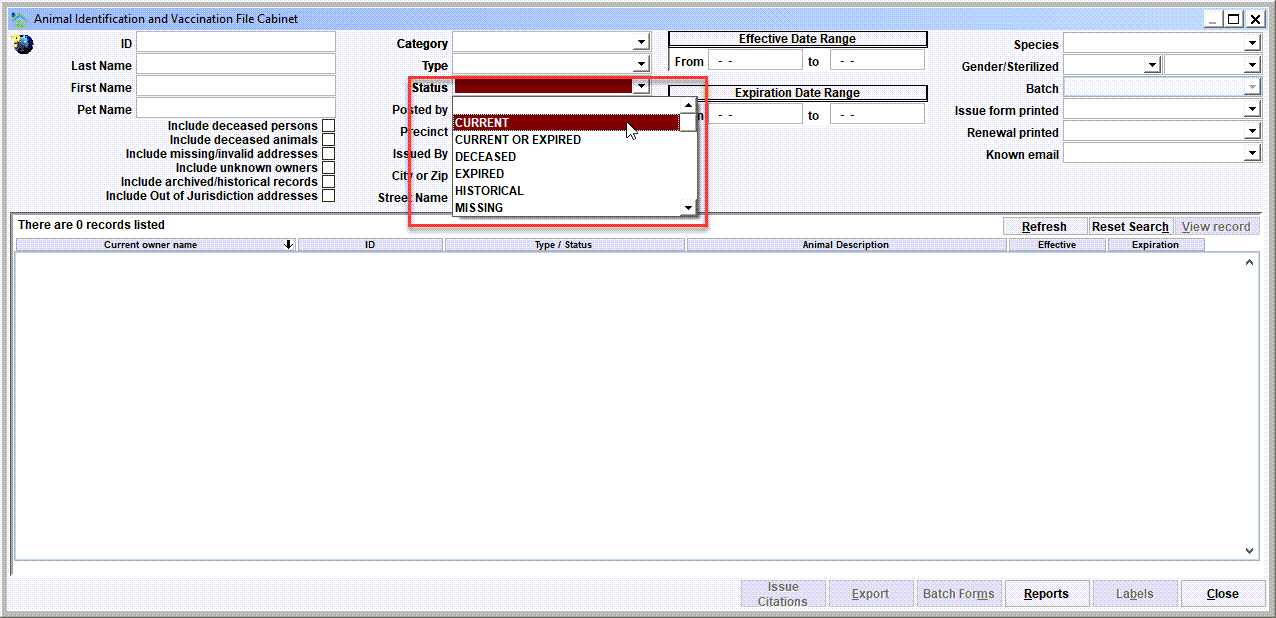
Searching the animal id records using the various statuses provides a robust variety of options covered in this topic. For purposes of this topic, let's clearly define the following terminology.
CURRENT means an id record's expiration date is greater than or equal to the current date.
EXPIRED means a record's expiration date is less than today's date and the record is the 'most recent' posting for the animal.
HISTORICAL means a record has an expiration date that is less than today's date, and the record is not the 'most recent' posting for the animal. Another common term for Historical is Archived.
MISSING means the non-existence of any record on the database.
APPROVED means the requirements for a record have been met. It is common to 'approve' the sale of a pet license because the pet owner has provided an up-to-date rabies certificate.
PENDING means a record has been initiated, but is 'pending' a review of meeting certain requirements. It is common to have a 'pending' license when the license has been purchased via Shelter Pro Portal, but the staff have not yet reviewed a provided (uploaded) rabies certificate.
REJECTED means a record has been initiated, but has been 'rejected' due to failing a specific requirement(s). It is common to have a 'rejected' license when the license has been purchased via Shelter Pro Portal, the staff have reviewed a provided (uploaded) rabies certificate, and the rabies certificate failed the requirement, such as being out of date or otherwise invalid.
Current, Expired, Historical searches
Setting the status to these values will produce these results.
- CURRENT - will search for id records where the status of the record is Current. For example, setting Category to License and setting Status to Current will retrieve license records where the expiration date is after yesterday's date.
- CURRENT OR EXPIRED - will search for id records where the status of the record is Current or Expired. For example, setting Category to License and setting Status to Current or Expired will retrieve license records where the expiration date is after yesterday's date (aka Current), or the expiration date is before today's date AND the license is the most recent posting for the animal.
- DECEASED - will search for id records where the animal is deceased.
- EXPIRED - will search for id records where the status of the record is Expired. For example, setting Category to License and setting Status to ** Expired** will retrieve license records where the expiration date is before today's date AND the license is the most recent posting for the animal.
- HISTORICAL - will search for id records where the status of the record is not Current and the record is NOT the most recent posting for the animal. For example, setting Category to License and setting Status to Historical will retrieve license records where the expiration date is before today's date AND the license is NOT the most recent posting for the animal.
Missing searches
- MISSING - will search for animals who are missing an id record. For example, setting Category to License and setting Status to Missing will retrieve animals who do not have any license records on the database.
- MISSING LICENSE - will search for animals who are missing a license record. For example, setting Category to Vaccinations and setting Status to Missing License will retrieve animals who have a vaccination record, but do not have any license records on the database.
- EXPIRED-NO CITATION - will search for animals who have an expired record, but a citation has not (yet) been generated for non-compliance. For example, setting Category to License and setting Status to Expired-No Citation will retrieve animals who have an expired license and the owner has not been cited for non-compliance.
- MISSING-NO CITATION - will search for animals who have no id record history, but a citation has not (yet) been generated for non-compliance. For example, setting Category to License and setting Status to Missing-No Citation will retrieve animals who have no license records in their history, and the owner has not been cited for non-compliance.
- MISSING LICENSE-NO CITATION - will search for animals who are missing a license record and the owner has not (yet) been cited for non-compliance. For example, setting Category to Vaccinations and setting Status to Missing License-No Citation will retrieve animals who have a vaccination record, do not have any license records, and the owner has not been cited for non-compliance.
Approved searches
- APPROVED - will search for license records that have been approved. Note that 'APPROVED' without any following characters is a generic search and will retrieve records where the status starts with the value 'APPROVED'.
- APPROVED-VERIFIED - will search for license records where one of the 'proofs' is equal to this value. "Verified" would indicate a staff member reviewed a requirement, and verified that the requirement was met.
- APPROVED-UNVERIFIED - will search for license records where one of the 'proofs' is equal to this value. "UnVerified" would indicate a staff member reviewed a requirement, was unable to verify it's validity, but approved the requirement.
- APPROVED-CURRENT WHEN ISSUED - will search for license records where one of the 'proofs' is equal to this value. "Current When Issued" would indicate another record on the database existed that met a particular requirement. For example, an owner may purchase license which has a current rabies vaccination requirement, and the pet had a rabies vaccination that was provided from a prior year that was still 'current' at the time and therefore the requirement was met.
- APPROVED-NOT REQUIRED - will search for license records where one of the 'proofs' is equal to this value. "Not required" would indicate the particular proof was not a requirement.
- APPROVED-OTHER - will search for license records where one of the 'proofs' is equal to this value. "Other" would indicate a staff member reviewed a requirement, and approved the requirement for 'other' reasons.
Pending searches
- PENDING - will search for license records which are pending. Note that 'PENDING' without any following characters is a generic search and will retrieve records where the status starts with the value 'PENDING'.
- PENDING-MAIL IN - will search for license records where one of the 'proofs' is equal to this value. "Pending-Mail In" would indicate the pet owner purchased a license via Shelter Pro Portal, and any documents required and being sent via mail.
- PENDING-REVIEW READY - will search for license records where one of the 'proofs' is equal to this value. "Pending-Review Ready" would indicate the pet owner purchased a license via Shelter Pro Portal, and one or more documents where uploaded and need to be reviewed to complete the record.
Rejected searches
- REJECTED - will search for license records which have been rejected for any reason. Note that 'REJECTED' without any following characters is a generic search and will retrieve records where the status starts with the value 'REJECTED'.
- REJECTED-DOCUMENT INVALID - will search for license records where one of the 'proofs' is equal to this value. "Document Invalid" would indicate a staff member reviewed a requirement, and the document did not correctly meet the requirement.
- REJECTED-DOCUMENT UNREADABLE - will search for license records where one of the 'proofs' is equal to this value. "Document Unreadable" would indicate a staff member reviewed a requirement, and the document was not intelligible and therefore did not correctly meet the requirement.
- REJECTED-DOCUMENT NOT RECEIVED - will search for license records where one of the 'proofs' is equal to this value. "Document Not Received" would indicate a staff member reviewed a requirement, and after an adequate amount of time had passed where necessary documentation was never provided by the owner.
- REJECTED-DATES DO NOT MATCH - will search for license records where one of the 'proofs' is equal to this value. "Dates do not match" would indicate a staff member reviewed a document, however the dates did not match what the owner claimed the document would authenticate.
- REJECTED-NOT MICROCHIPPED - will search for license records where one of the 'proofs' is equal to this value. "Not microchipped" would indicate a staff member reviewed a document, however it was determined the pet was not microchipped, and having a microchip was a requirement for the license purchase.
- REJECTED-NOT STERILIZED - will search for license records where one of the 'proofs' is equal to this value. "Not sterilized" would indicate a staff member reviewed a document, however it was determined the pet was not altered, and being altered was a requirement for the license purchase.
- REJECTED-NOT VACCINATED - will search for license records where one of the 'proofs' is equal to this value. "Not vaccinated" would indicate a staff member reviewed a document, however it was determined the pet was not vaccinated, and having a vaccination was a requirement for the license purchase.
- REJECTED-OUT OF DATE/EXPIRED - will search for license records where one of the 'proofs' is equal to this value. "Out of date/expired" would indicate a staff member reviewed a document, however the dates were determined to not be current.
- REJECTED-OTHER - will search for license records where one of the 'proofs' is equal to this value. "Other" would indicate a staff member reviewed a requirement, and rejected the license for 'other' reasons.
Next Topic
Comment or report problem with topic