
 Generating a batch of non-compliance citations based on vaccination dates
Generating a batch of non-compliance citations based on vaccination dates
To generate a batch of license non-compliance citations based on a record of vaccination, use the 'Batch Forms' feature of the Animal IDs File Cabinet. Note that it is necessary to have Shelter Pro's Animal Control module to post citations.
For this example, we will be looking for DOGs on the database with a known owner and in-jurisdiction address, where we have a record of vaccination in January 2019, who do not have a license for their pet, and a citation of licensing non-compliance has not been previously generated.
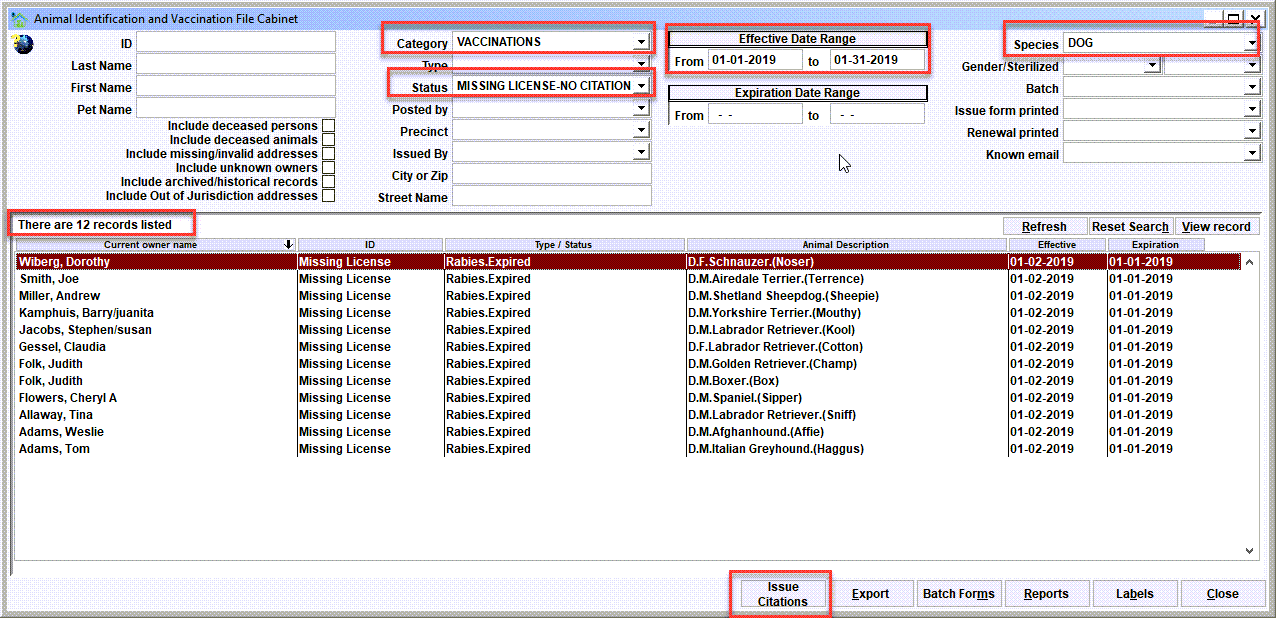
Notice the following:
- Category = 'Vaccinations';
- Status = 'Missing License-No Citation';
- Effective Date Range = 01-01-2019 to 01-31-2019,
- Species = 'DOG';
- The results show 12 records;
- The 'Issue Citations' button.
Tip: It's possible to filter the results to persons whose current physical address is in a particular city or postal code. Notice the 'City or Zip' selection in the filter. Set this to an appropriate value for your jurisdiction to filter the results.
Issue Citations
After getting the results, click the 'Issue Citations' button to initiate the batch generation.
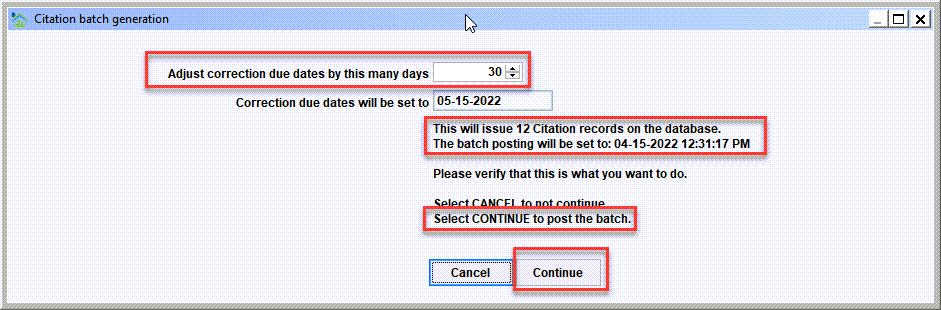
For generating the batch, notice the following buttons:
- Adjust correction due dates by this many days. For each citation, a correction due date will be set. This is commonly used as a 'grace' period giving the owner a window of time to get their pet licensed, and the citation will be dismissed.
- The Batch posting date will be set to.... Each batch will have an assigned date/time stamp. This can be used in the Citation File Cabinet to retrieve the batch.
- The Continue button commences the generation of the citations.
Upon clicking Continue, you will notice that the citations are posted one by one until the batch generation is complete.
Viewing the batch
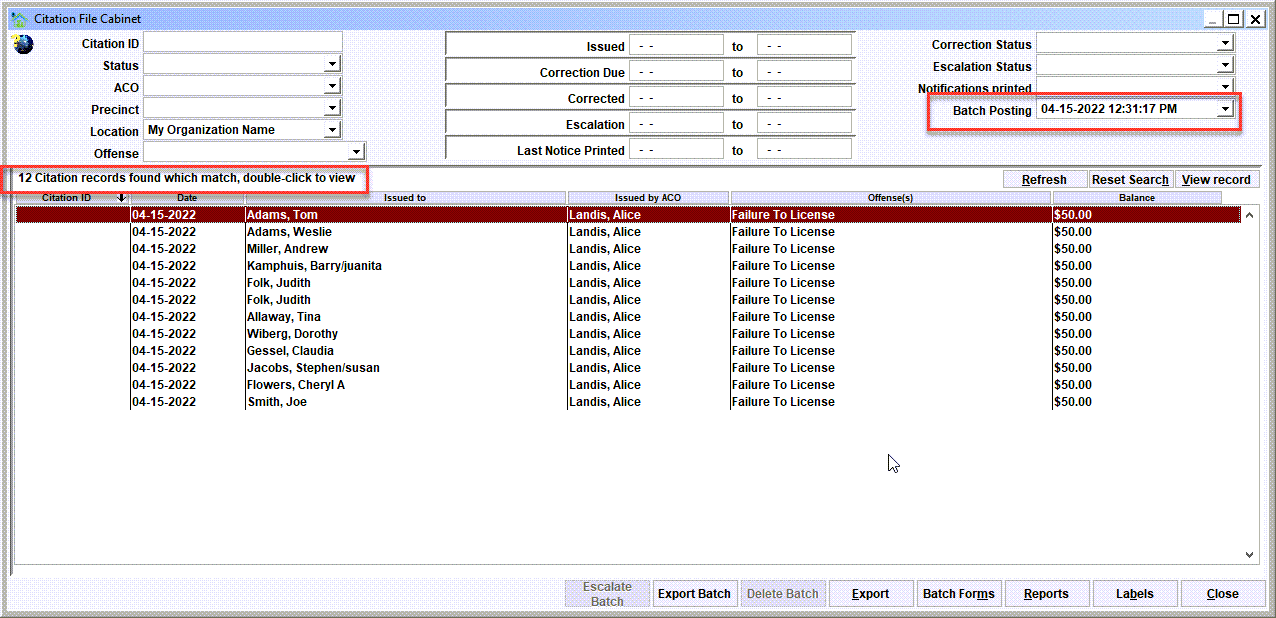
To view the generated citation batch, see ANIMAL CONTROL/CITATION FILE CABINET and set the "Batch Posting" to the corresponding date/time stamp of the batch. The citations for the batch will show in the results window.
Batch Forms
After getting the results, click the 'Batch Forms' button to bring up the various forms which can be generated for the Animal Control Module's Citation records. In this example, we are generating a customized 'Citation for Licensing Non-compliance'. This particular form will include:
- The owner and their mailing address
- The pet that is 'missing' a license
- The fine amount (if any)
- A customized letter providing further instruction to the owner
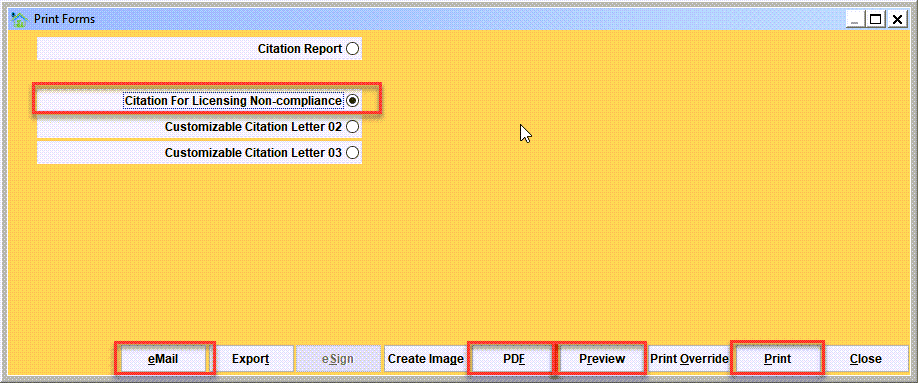
For generating the batch, notice the following buttons:
- The Print button will print the notices to the default printer.
- The Preview button will generate a preview of the printed batch.
- The PDF button will generate a pdf of the print batch.
- The Email button will email each notice the owner's email address.
Tip: Printing your batches to a PDF has some valuable benefits. The biggest benefit is that the PDF preserves the batch, and it's then possible to go back to the PDF as a 'trail' of the exact notices that were generated. So if an owner claims that they did not receive their notice, then going back the PDF is some level of confirmation of whether or not the notice was generated. Keep in mind you can print the batch from the PDF, and you can selectively print (or reprint) individual notices from the PDF.
Next Topic
Comment or report problem with topic