
 Customize Forms
Customize Forms
Settings on this tab affect the general appearance of printed forms produced by Shelter Pro.
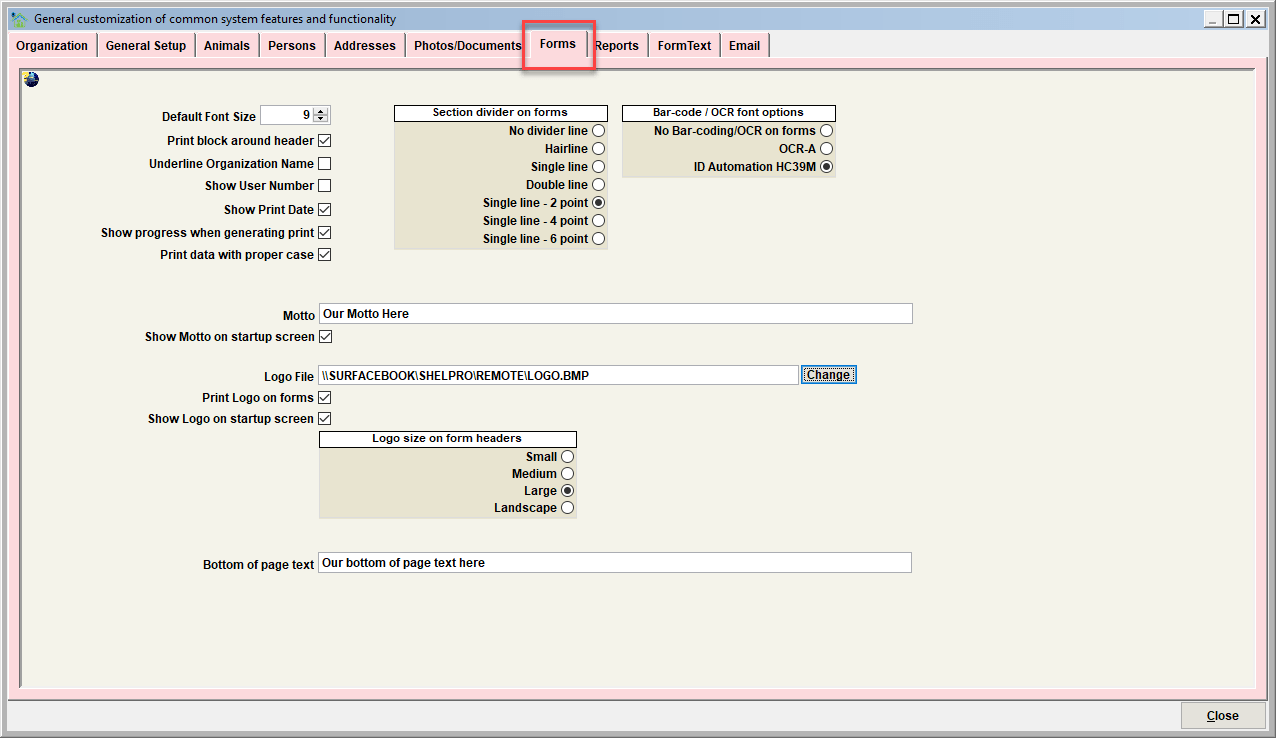
Default font size
Choose a font size of 8, 9, or 10 for all generated forms. This is the system-wide default font size. Note that individual forms can ‘override’ the default font size on a form by form basis from the ‘Form Text’ settings for individual forms.
Print block around header
Turn this switch to print a rectangular frame around form headers.
Underline Organization Name
Turn this switch on to underline the organization name forms.
Show user number
Turn this switch on to print the user number of the user who generated a printed form. The user number will be shown in each form’s footer.
Show print date
Turn this switch on to show the date a printed form was generated. The date will be shown in each form’s footer.
Show progress when generating print
Turn this switch on to show a progress meter when generating a large batch of forms using a “Batch Forms” function.
Print data with proper case
Causes form output to automatically apply ‘proper case’ formatting.
Section Divider
This setting controls the sizing of horizontal lines that prints between form sections.
Bar-code / OCR font options
Choose the font used if printing bar codes on forms. Note that the selected font must be installed on the workstation for bar-code printing to be an option. Also note that individual forms can have bar-coding enabled/disabled on a form by form basis via the various "Form Text" customizations.
Motto
Enter your organization’s motto here. If you don’t have a motto, or do not want the motto to print on forms, set this to spaces.
Logo file
This is the location of your organization's logo file. Typically the file would be stored on the server so that the file is accessible to all workstations running Shelter Pro.
Print logo on forms
This switch must be enabled to have the logo print on forms headers.
Logo size
Specify the size you would like for the logo to print
- small (only applies if the logo is square in shape)
- medium (only applies if the logo is square in shape)
- large (only applies if the logo is square in shape)
- landscape (use this option if the logo has a landscape orientation)
Bottom of page text
This is an additional text line to be printed in the footer section of your forms. Leave this blank if there is no text needed. Keep this short, it's just a single print line.
Next Topic
Comment or report problem with topic