
 Customize Incidents
Customize Incidents
This window allows you to enter processing parameters for an Incident. These settings can be modified according to the needs of your organization.
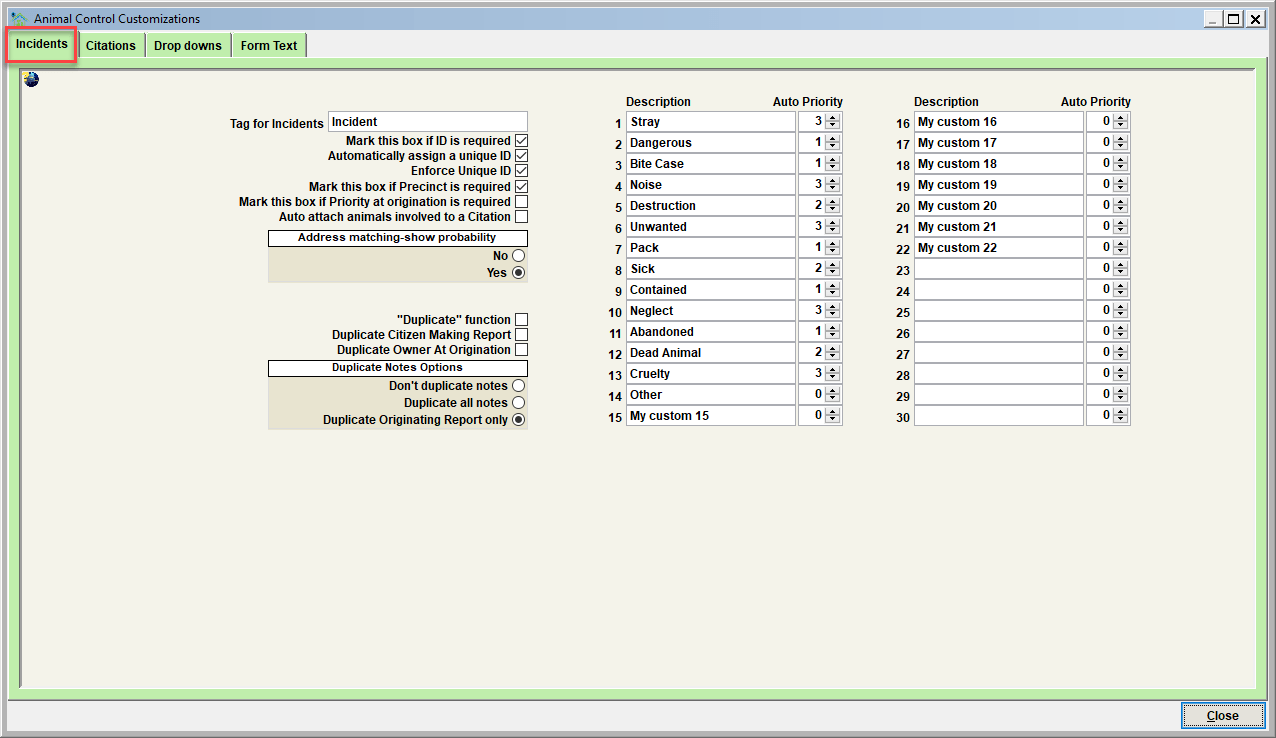
Tag for Incidents
This field should be set to the terminology your facility uses to describe an Incident (Call, Run, Complaint, etc). By changing this field, the same terminology will be used throughout the Shelter Pro system (including windows, reports, and forms).
Mark this box if ID is required
This field will determine if the Incident ID must be specified before a new incident can be saved. If this feature is used, an error message will appear if an attempt is made to save a new incident without the required Incident ID.
Automatically assign a unique ID
This field will determine if Shelter Pro will automatically assign a Unique ID number to each new incident. If this feature is used, the unique ID will be assigned when New is clicked on the Incident View window.
Enforce Unique ID
This field will determine if the Incident ID must be unique. This means that no other incident with an identical Incident ID exists within the system. If this feature is used, an error message will appear if an attempt is made to save a new incident that has been assigned an already-existing Incident ID.
Mark this box if Precinct is required
This field will determine if the Precinct must be specified before a new incident can be saved. If this feature is used, an error message will appear if an attempt is made to save a new incident without the required Precinct information.
Mark this box if Priority at origination is required
This field will determine if the Priority must be specified before a new incident can be saved. If this feature is used, an error message will appear if an attempt is made to save a new incident with the Priority set at zero (0).
Automatically attach animals involved to a citation
This switch is used when a citation is 'issued' using the Citation tab on an incident record. If enabled, any/all animals linked to the incident will be automatically linked to a newly issued citation.
Address matching – show probability
This setting determines if the system will show a 'percentage match probability' when listing address matches for address search results.
Duplicate function
This setting determines if an incident can be duplicated (aka cloned). Duplicating an incident is useful to the user group for their 'repeat offenders' who generate repeated animal control activity. When an incident is 'duplicated' it saves the user considerable time as information is auto-set using details from the duplicated incident as a 'template.
Duplicate citizen making report
When an incident is duplicated, this setting determines if the duplicate links to same 'citizen making report' from the duplicated incident.
Duplicate owner at origination
When an incident is duplicated, this setting determines if the duplicate links to same 'owner' from the duplicated incident.
Duplicate notes
- Don't duplicate notes - when an incident is duplicated, none of the notes records are duplicated.
- Duplicate all notes - when an incident is duplicated, all of the notes records are duplicated.
- Duplicate originating report only - when an incident is duplicated, only the originating report note is duplicated.
Custom reason codes (description/tag)
Shelter Pro will allow thirty (30) reason codes to be set on a custom basis. Do this by filling in any of the thirty text fields. These reason codes will then show as check boxes on the Incident View screen.
Tip - for any of the reason codes which are not used, set the description to blank. This will cause the description to be hidden on the screen so that a user can't select it for the record.
Automatic priority for each reason
These values can be used to automatically assign a Priority to each incident reason. One (1) is considered the highest priority, and five (5) is the lowest priority. Here are few other relevant talking points:
- If multiple reason choices are selected on an incident, the highest priority among the multiple choices is used.
- If your facility uses priority levels 1/2/3, do not set any of the automatic priority levels to a value higher than three (3).
- If you do not wish to have Priority automatically determined, set each automatic priority to zero (0).
Next Topic
Comment or report problem with topic