
 Customize Citations
Customize Citations
This window allows you to enter processing parameters for a Citation. These settings can be modified according to the needs of your organization.
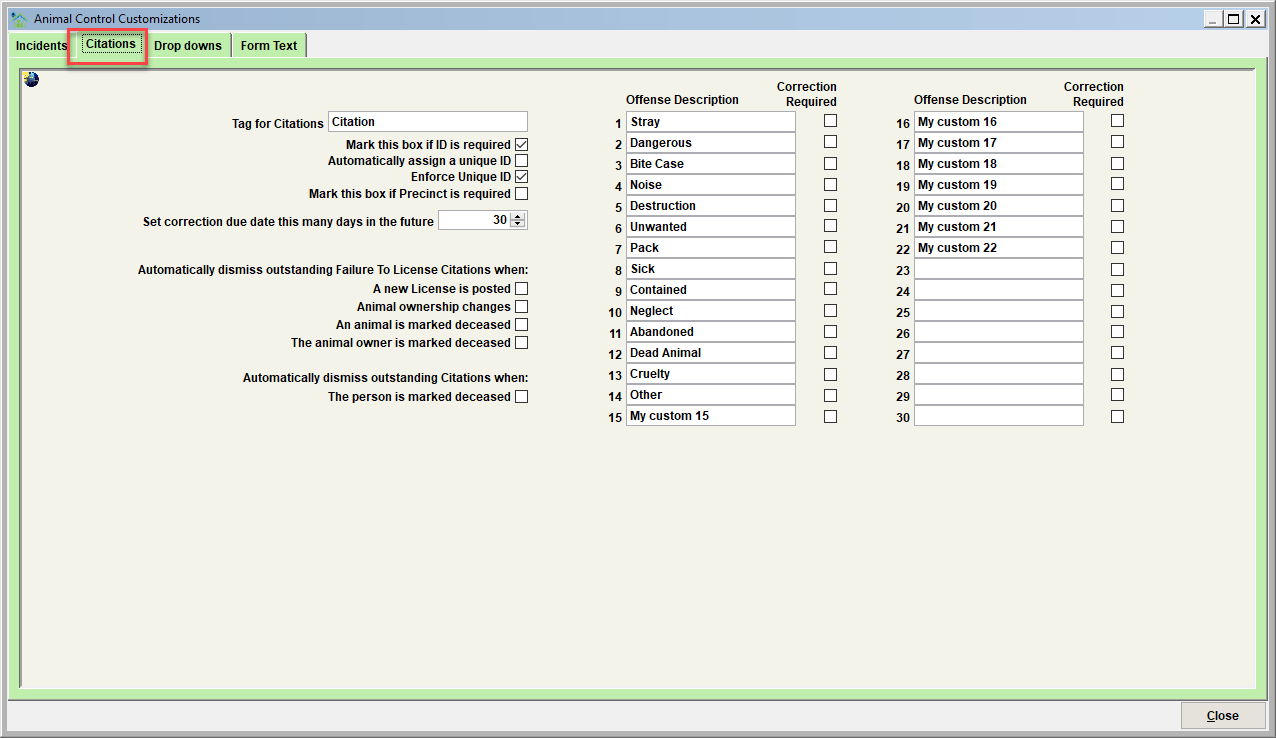
Tag for Citations
This field should be set to the terminology your facility uses to describe a Citation (Ticket, Write-up, etc). By changing this field, the same terminology will be used throughout the Shelter Pro system (including windows, reports, and forms).
Mark this box if ID is required
This field will determine if the Citation ID must be specified before a new citation can be saved. If this feature is used, an error message will appear if an attempt is made to save a new citation without the required Citation ID.
Automatically assign a unique ID
This field will determine if Shelter Pro will automatically assign a Unique ID number to each new citation. If this feature is used, the unique ID will be assigned when New is clicked on the Citation View window.
Enforce Unique ID
This field will determine if the Citation ID must be Unique. This means that no other Citation with an identical Citation ID exists within the system. If this feature is used, an error message will appear if an attempt is made to save a new citation that has been assigned an already-existing Citation ID.
Mark this box to require Precinct
This field will determine if the Precinct must be specified before a new citation can be saved. If this feature is used, an error message will appear if an attempt is made to save a new citation without the required Precinct information.
Set correction due date this many days in the future
This field will determine how a citation’s “correction due date” is determined. If citation is posted with an offense that has the 'correction required' check box marked, the correction due date will be autoset.
Automatically dismiss outstanding 'failure to license' citations when
A new license is posted
Scenario -
- Pet owner has been issued a citation for 'failure to license' a particular pet.
- The citation is outstanding (not dismissed, not paid).
- The owner purchases a license for the pet.
Result - this feature will automatically dismiss the citation, including reversing any fines that were posted with the citation.
Animal ownership changes
Scenario -
- Pet owner has been issued a citation for 'failure to license' a particular pet.
- The citation is outstanding (not dismissed, not paid).
- On the animal record, the current owner is changed to another owner due to change in ownership of the pet.
Result - this feature will automatically dismiss the citation, including reversing any fines that were posted with the citation.
An animal is marked as deceased
Scenario -
- Pet owner has been issued a citation for 'failure to license' a particular pet.
- The citation is outstanding (not dismissed, not paid).
- It is determined that the animal is deceased. On the animal record, the deceased indicator is checked.
Result - this feature will automatically dismiss the citation, including reversing any fines that were posted with the citation.
The animal owner is marked as deceased
Scenario -
- Pet owner has been issued a citation for 'failure to license' a particular pet.
- The citation is outstanding (not dismissed, not paid).
- It is determined that the owner is deceased. On the person record, the type is set to 'deceased'.
Result - this feature will automatically dismiss the citation, including reversing any fines that were posted with the citation.
Automatically dismiss outstanding citations when
The person is marked as deceased
Scenario -
- Citizen has been issued one or more citations for any animal control related offenses.
- The citation(s) is outstanding (not dismissed, not paid).
- It is determined that the owner is deceased. On the person record, the type is set to 'deceased'.
Result - this feature will automatically dismiss the citation(s), including reversing any fines that were posted with the citation.
Custom reason codes (description/tag)
Shelter Pro will allow thirty (30) reason codes to be set on a custom basis. Do this by filling in any of the thirty text fields. These reason codes will then show as check boxes on the Citation View screen.
Custom Offense descriptions (description/tag)
Shelter Pro will allow thirty (30) offense codes to be set on a custom basis. Do this by filling in any of the thirty text fields. These offense codes will then show as check boxes on the Citation View screen.
Tip - for any of the offense codes which are not used, set the description to blank. This will cause the description to be hidden on the screen so that a user can't select it for the record.
Tip - Where possible, there is value in having citation offense descriptions exactly match your organizations incident description codes. Then, if/when a citation is issued from the incident, any offense codes that are an exact match will be autoset on the newly issued citation. For example, if the incident has the 'stray' offense code marked, and there is a citation offense description defined as 'stray', when the citation is issued the 'stray' offense will be autoset.
Correction Required
These values can be used to automatically mark a new citation to have a correction that will be required as a result of the cite. Note that this also includes setting the 'correction due date' on the cite.
Next Topic
Comment or report problem with topic