
 Customize Process
Customize Process Tab
.png)
This window allows you to enter optional processing parameters according to your facility's needs. These features can make Shelter Pro easier to use.
Adoption / Quarantine Days Customization

Specify how many days an animal should await adoption before re-evaluation
This field is used to set the Evaluation Due Date (the date on which an animal's status will become due for re-evaluation.) When the evaluation due date has passed, the Evaluation Due Summary will report that the animal is due for adoption re-evaluation.
Specify how many days an animal must be quarantined if necessary
This field sets the number of days an animal must be quarantined if necessary. When the minimum quarantine due date has passed, the Evaluation Due Summary will report that the animal's quarantine status is due for re-evaluation.
Kennel Card Options
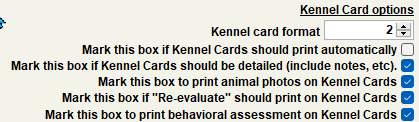
Kennel Card (Full Page)
The Kennel Card (Full Page) is a printable single-page document that lists pertinent information for the selected animal. Shelter Pro provides two document formatting options to select from based on the preferences of the Organization. The following information highlights the customizable features between Format #1 and Format #2. You can specify your preferred Kennel Card format by selecting either "1" or "2" in the Kennel Card selection area.
The bellow image is a comparison of Format #1 and Format #2 with ALL optional information selected. Keep in mind the information displayed is customizable to the preference of the Organization.
%20compairson..png)
Kennel Card (Half-Page)
The Kennel Card (Half-Page) is a printable single-page document that lists pertinent information for the selected animal. Shelter Pro provides two document formatting options to select from based on the preferences of the organization. The following information highlights the customizable features between Format #1 and Format #2. You can specify your preferred Kennel Card format by selecting either "1" or "2" in the Kennel Card selection area.
The bellow image is a comparison of Format #1 and Format #2 with ALL optional information selected. Keep in mind the information displayed is customizable to the preference of the Organization.
%20compairson..png)
Other Kennel Card Options:
Mark this box if Kennel Cards should print automatically
This function allows Shelter Pro to automatically print a kennel card when an animal enters the facility or is moved to a new location within the facility. If this option is NOT selected, you may manually print a kennel card by selecting the Print Forms button from the Case View window or the Case File window.
Mark this box if kennel cards should be detailed (include notes, etc.)
This switch determines if detailed animal description data and notes will print on the Kennel card.
Mark this box to print animal photos on kennel cards
This switch determines if an animal's primary photo will print on a kennel card. Detailed animal description data, photos, and notes will print on the kennel card.
Mark this box if Re-evaluate Date should print on kennel cards
You should mark this box if you want Shelter Pro to automatically print the "Evaluation Due Date" on kennel cards.
Mark this box to print Behavioral Assessment on kennel cards
You should mark this box if you want Shelter Pro to automatically print the Behavioral Assessment section on kennel cards.
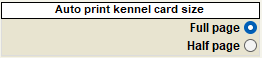
Auto Print should print full-page version of Kennel Card, or half-page version
Shelter Pro provides two Kennel card formats, and full-page and a half-page version. This switch controls which form will be auto-printed.
Kennel Assignment Options
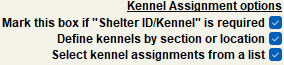
"Mark this box if Shelter ID/Kennel" is required
This field will determine if a Shelter ID/Kennel/Cage identifier of each case must be specified before the case can be saved. This function makes it easier for you to keep track of each animal's location. Also, note that the Shelter/ID/Kennel for each case can be used for any Case Identification values you desire.
Define kennels by section or location
This option will allow data entry of Kennel Sections via a list selection (e.g., Dog-Holding, Dog-Available, Cat-Holding, Cat-Available, Quarantine, etc.). You can define a list of recognized "Kennel Sections" under Drop-downs. Additionally, you will be able to define recognized kennels (cages, pens, etc.) within each Kennel Section.
Select kennel assignments from a list
This option causes the kennel data to be selectable from a drop-down list rather than data entry via a text field. Note that this would require you to create a drop-down list of your kennel values.
Mark this box to print animal photos on Case Reports
This switch determines if an animal's primary photo will print on a case report. Detailed animal description data, photos, and notes will print on the case report.
Mark this box if connected animal control citations should show on the case view
This option will cause any citations which were issued during a linked animal control incident to show as a tab on the case view.
Open lost animal reports will automatically expire after this many days
This field allows the user to specify the number of days that an open lost animal report will automatically expire after. For example, suppose the user selects 5 days. In that case, the lost animal report will automatically be listed as expired after the fifth day.
Open wish list requests will automatically expire after this many days
This field allows the user to specify the number of days that an open wish list request will automatically expire after. For example, suppose the user selects 5 days. In that case, the wish list request will automatically be listed as expired after the fifth day.
Pet Detect Options
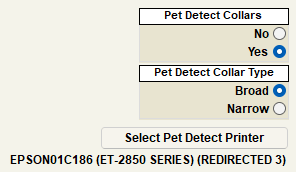
Pet Detect is a Shelter Pro Partner feature that generates a printable label on a collar that displays the selected animal's information. Pet Detect Collars have various collar sizes that can be selected depending on the animal's size. The Pet Detect Collar type can be printed in either a "Broad" or "Narrow" size based on the preferences of the Organization.
Tip: For additional information on the Pet Detect Collars, Click here
Next Topic
Customize Disposition
Comment or report problem with topic