
 Customize Disposition
Customize Disposition Tab
This window allows you to enter processing parameters for the Disposition of animals.
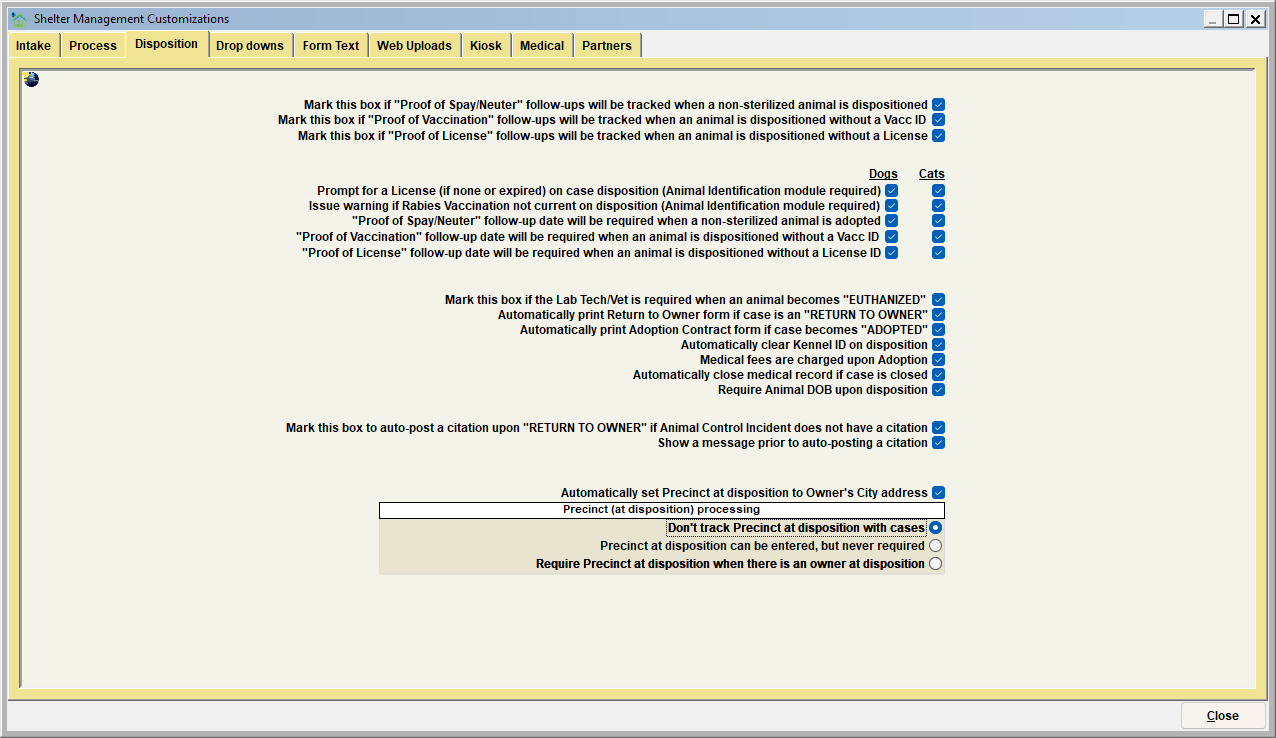
Mark this box if Proof of Spay/Neuter follow-ups…
A "Proof of Spay/Neuter" follow-Up Date can be set when a non-sterilized animal is dispositioned. This date will work in connection with the Follow-up Reminder Notice, which can be printed once the date has passed on a given Case. When the proof is provided, the date can be removed from the Case indicating the follow-up is no longer necessary.
Mark this box if Proof of Vaccination follow-ups…
A "Proof of Vaccination" follow-Up date can be set when a non-vaccinated animal is dispositioned. This date will work in connection with the Follow-up Reminder Notice, which can be printed once the date has passed on a given Case. When the proof is provided, the date can be removed from the Case indicating the follow-up is no longer necessary.
Mark this box if Proof of License follow-ups…
A "Proof of License" follow-Up Date can be set when a non-licensed animal is dispositioned. This date will work in connection with the Follow-up Reminder Notice, which can be printed once the date has passed on a given Case. When the proof is provided, the date can be removed from the Case indicating the follow-up is no longer necessary.
Prompt for a license (if none or expired) on case disposition
This switch will determine if Shelter Pro will prompt a user for a 'license' when an unlicensed animal is dispositioned (adopted, returned to owner, etc.). This switch is controlled independently for Dogs and Cats. Also note that the "Animal Identification" module must be in use, as this module is the licensing functionality of Shelter Pro.
Issue warning if Rabies vaccination not current on case disposition
This switch will determine if Shelter Pro will warn the user if an up-to-date rabies vaccination is not detected when an animal is dispositioned (adopted, returned to owner, etc.). This switch is controlled independently for Dogs and Cats. Also note that the "Animal Identification" module must be in use, as this module is the licensing functionality of Shelter Pro.
"Proof of spay/neuter" follow-up date will be required when a non-sterilized animal is dispositioned
This switch will determine if Shelter Pro will require the user to enter a spay/neuter proof due date when a non-sterilized animal is dispositioned (adopted, returned to owner, etc.). This switch is controlled independently for Dogs and Cats.
"Proof of vaccination" follow-up date will be required when an animal is dispositioned without a vacc id
This switch will determine if Shelter Pro will require the user to enter a vaccination proof due date when an animal is dispositioned (adopted, returned to owner, etc.) without a vaccination ID. This switch is controlled independently for Dogs and Cats.
"Proof of license" follow-up date will be required when an animal is dispositioned without a license id
This switch will determine if Shelter Pro will require the user to enter a license proof due date when an animal is dispositioned (adopted, returned to owner, etc.) without a license ID. This switch is controlled independently for Dogs and Cats.
Mark this box if the Lab Tech/Vet is required when an animal becomes "EUTHANIZED."
The Lab Technician/Vet Required option should be selected if this facility tracks euthanasia performed. When an animal is euthanized, the user will also be required to select who performed the procedure.
Automatically print Return to Owner Form if Case is a "RETURN TO OWNER."
Most facilities require an owner's signature when an owner claims their pet from the facility. Automatic Return-to-Owner Form Printing will cause the Return-to-Owner form to automatically print when an animal is returned to its owner. If this option was not selected during the customization process, you may manually print a Return-to-Owner form by selecting Print Forms from the Case View window or the Case File Cabinet window.
Automatically print Adoption Contract Form if Case becomes "ADOPTED."
Most facilities require an owner's signature when a citizen adopts a pet. Automatic Adoption Contract Form Printing will cause the Adoption Contract form to automatically print when an animal is adopted. If this option is not selected during the customization process, you may manually print an Adoption Contract form by selecting Print Forms from the Case View window or the Case File Cabinet window.
Automatically clear Kennel ID on Disposition
This switch will cause the Shelter/Kennel ID field to be cleared when an animal is dispositioned. This would be useful when your facility assigns a temporary identification to an impounded animal (such as a Kennel ID assignment or a temporary tag that only stays on the animal while in the shelter). If you assign IDs that should be kept with the Case after Disposition, this switch should be unchecked.
Medical Fees are charged upon adoption
If Medical charges are to be charged to an adopting person (in addition to standard adoption charges), then check this switch.
Automatically close medical record if Case is closed
If a case becomes "CLOSED," this switch will cause the medical record associated with the Case to automatically be closed.
Require Animal DOB upon Disposition
This switch will cause Shelter Pro to require the animal's Date of Birth upon Disposition of the Case if one has not already been entered.
Mark this box to auto-post a citation upon "Return to Owner" if animal control incident does not have a citation
When a RETURN TO OWNER is posted, it usually means a stray animal intake occurred, and a citation for the offense of 'stray' may be appropriate. This option will automatically create a citation for the owner during the disposition process.
Show a message prior to auto-posting a citation
If a citation will be automatically created when processing a RETURN TO OWNER, this option will warn the user that a citation is about to be issued and give the opportunity to skip the citation issue.
Automatically set Precinct at Disposition to Owner's City address
At the Disposition of a case, Shelter Pro will automatically set the Precinct to the Owner's City Address.
Precinct at disposition processing
This option causes the system to record a 'precinct at disposition' value for the case record. There are three selectable options:
- Don't track Precinct at Disposition with cases,
- Precinct at Disposition can be entered, but never required,
- Require Precinct at Disposition when there is an owner at Disposition.
Next Topic
Customize Drop downs (Shelter Management)
Comment or report problem with topic