
 Case View - Service Details
Case View - Service Details
Medical Service records are used to document services, include procedures that are done for an animal.
Medical Service Details
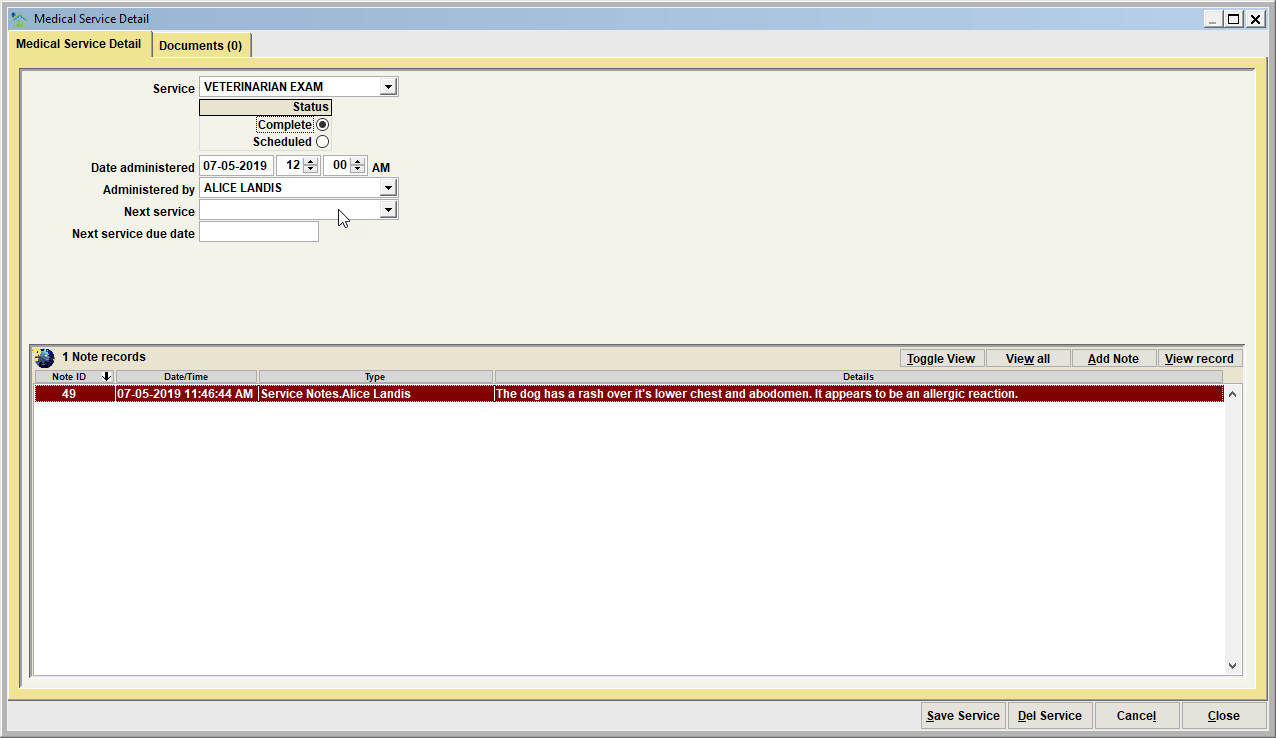
Service details will document the following data elements.
Service
This is the service performed. Note that this list can be modified via the customizable dropdown list MEDICAL_SERVICE.
Status
The status of the service, which can be complete or scheduled. When adding a new record, setting the status to scheduled would be used to pre-schedule the item to be completed at a later date. Note that when status is set to scheduled, the date administered label will be re-labeled to date scheduled. This date can be changed to the future, scheduled date when the medical item is to be completed.
Date Administered / Date Scheduled
The date/time stamp when the item was either completed, or when the item was scheduled.
Administered By/Scheduled By
The person or entity that completed or scheduled the medical item. This list will show vets, vet clinics, and staff members.
Next service
If a later/subsequent test is to be scheduled, select the test type to be scheduled.
Next service due date
If a later/subsequent service is to be scheduled, enter the future date specifying when the test will become due.
Notes
Notes are optional, but are very commonly used and needed to provide adequate details about the particular record entered on the database. With notes you'll find there are varying note types which are specific to any particular event type.
For a test, some common note types would include 'Test Notes', 'Test Results', etc. There may be additional note types defined on your Shelter Pro as note types can be extended using Shelter Pro's Customize features. This list can be modified via the customizable dropdown list NOTE_TYPE_MEDSERV.
Click on the Add Note button to add a new note, or View Note to open, review, edit an existing note. The View All will present all notes combined in chronological order for ease reading the full narrative on one screen. The Toggle View button will cause the content in the list to be changed to a different display setting.
For an overview of notes in Shelter Pro, click Notes and Narratives
Documents Tab
The Documents tab will show any posted document images relevant to the Diagnostic Test. There are many potential uses for Document Imaging relative to a test, however you are not limited to just these:
- Any images relevant to the animal's medical history that might have particular relevance to the service.
For an overview of Document Imaging in Shelter Pro, click Document Imaging
Next Topic:
Comment or report problem with topic