
 Bite Case - Bite Tab
Bite Case Record - Bite Tab
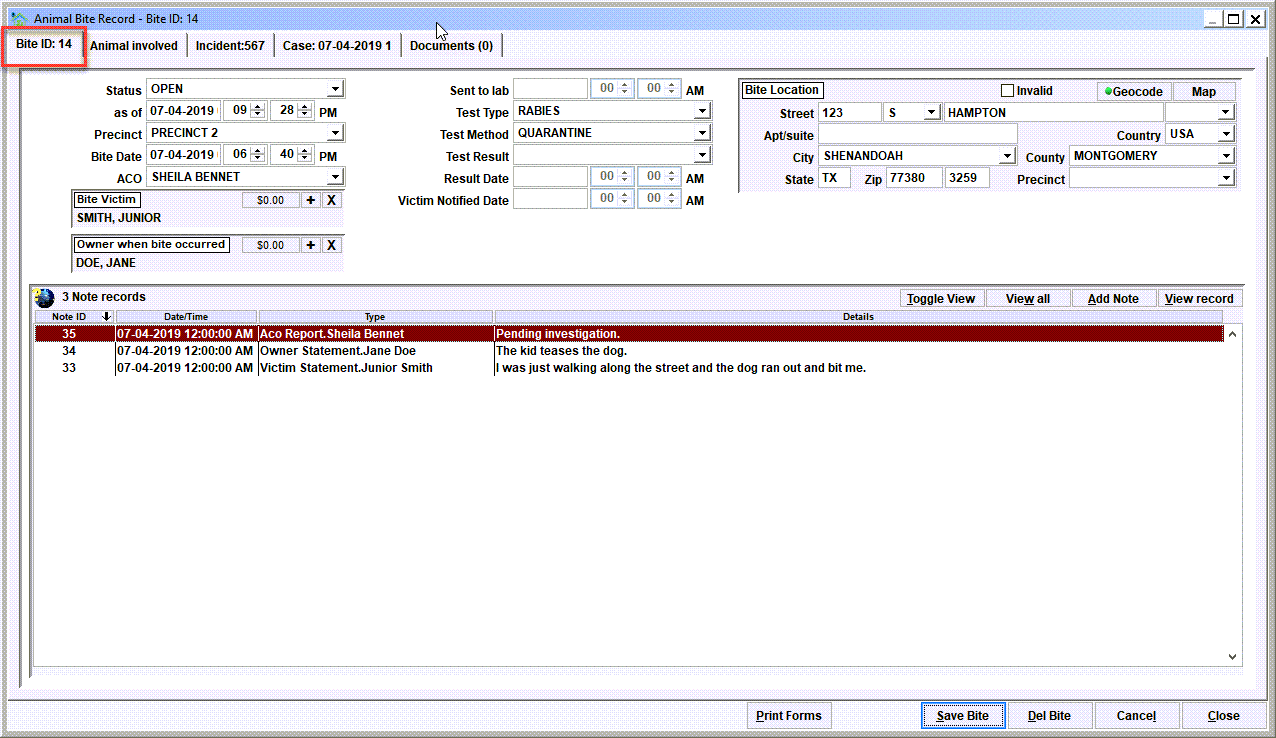
The Bite Record View is used to work with an individual bite record. The first tab shows the primary data related to a bite record. Notice how our example shows 'Bite: 14' in the tab name. The 14 is the tracking number.
Notice the File Cabinet, Print Forms, New, etc. buttons...
For a quick rundown of the buttons on typical event view windows, see Buttons - Commands and Navigation
The Title Bar

For a bite record, the title bar will show the highest level of overview. The title bar content will stay the same no matter which tab is being viewed.
Data elements with Bite records
Status
This is the current status of the bite record. Typical values would include:
- Open - the bite record is an open work in progress;
- Closed - the bite record is closed and no further activity is expected;
- Sent to lab - a specimen has been sent to a laboratory for testing purposes, and the result has not been received.
While these values are common, there may be other statuses defined on your Shelter Pro.
As of
This value represents the time stamp when the status was last updated. It will be automatically set when the status is modified. The value can be altered if needed.
Precinct
The precinct values are used to specify the geography a bite record will be associated with and reported under for monthly/annual reporting. The precinct may or may not be required depending on your organization's settings. Also note that the term 'Precinct' may not be used by your department as this term can be modified. It might be another term such as 'Jurisdiction', 'Municipality', 'City', etc depending on your department's particular terminology.
Bite Date
This value represents the time stamp when the encounter occurred between the animal and victim. The value can be altered if needed.
ACO
This value will be the ACO (Animal Control Officer) who is assigned to work on a particular bite case.
Bite Victim
This should be linked to the person database 'Person' who was the bite victim.
Owner when bite occurred
This should be linked to the person database 'Person' who is the pet owner (if and when known). The element is optional as it is common to have a bite record where the owner cannot be determined. But when known this value should be set so that a citizen's history will include the bite record in their history.
Sent to lab
This value represents the time stamp when a specimen has been sent to a laboratory for testing purposes. It will be automatically be set when the status is set to 'SENT TO LAB'. The value can be altered if needed.
Test Type
This value represents the type of testing being performed. Typical values would include:
- Rabies - the animal is being tested for having contracted rabies
Test Method
This value represents the testing method being performed. Typical values would include:
- Quarantine - the animal is quarantined in shelter
- Quarantine-Home - the animal is quarantined at a home, typically the owner's home
- Quarantine-Vet - the animal is quarantined at a vet's facility
- DFA - a specimen has been sent to a laboratory for testing purposes
Test Result
This value represents the testing method being performed. Typical values would include:
- Negative - the animal was determined to not be positive for rabies
- Positive - the animal was determined to be positive for rabies
Result Date
The date the result was determined. This will be auto-set when the Test Result is modified. The value can be altered if needed.
Victim Notified Date
The date the victim was notified of the result. The value can be altered if needed.
Bite Location
This is where the address where the animal/victim encounter occurred.
Notes

Notes are optional. The are used to provide deeper details about the particular record entered on the database. With notes you'll find there are varying note types which are specific to any particular event type.
For a bite record some common note types would include 'Victim Statement', 'Owner Statement', 'Witness Statement', 'ACO Report', There may be additional note types defined on your Shelter Pro as note types can be extended using Shelter Pro's Customize features. This list can be modified via the customizable dropdown list NOTE_TYPE_BITE.
Click on the Add Note button to add a new note, or View Note to open, review, edit an existing note. The View All will present all notes combined in chronological order for ease reading the full narrative on one screen. The Toggle View button will cause the content in the list to be changed to a different display setting.
For an overview of notes in Shelter Pro, click Notes and Narratives
Next Topic
Comment or report problem with topic