
 Customize Intake
Customize Intake
.png)
This tab allows you to enter processing parameters for a new case or intake. You can set these parameters according to the needs of your facility.
Precinct Processing
Tip: For more information on how to customize/define the precinct terminology to the needs of the organization, see Customize Addresses.
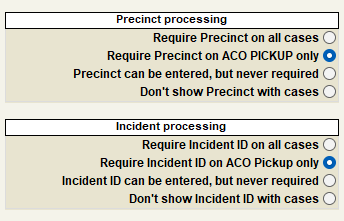
Require Precinct On All Cases
If this option is selected, Shelter Pro will not allow a new case to be saved if the precinct information is not entered at the time of the intake. This feature is helpful if your facility must report intakes for each precinct, municipality, or other geographic terminology defined by the organization.
Require Precinct on ACO PICKUP Only
If this option is selected, Shelter Pro will require precinct information to be specified for each ACO PICKUP case only.
Precinct Can Be Entered But Never Required
If this option is selected, Shelter Pro makes entering the precinct information on new intakes optional.
Don't Show Precinct With Cases
Shelter Pro will remove the precinct information from new intakes if this option is selected.
Incident Processing
Require Incident ID On All Cases
If this option is selected, Shelter Pro will require an Incident ID to be specified for each case.
Require Incident ID On ACO PICKUP Only
Shelter Pro will require an Incident ID to be specified for each ACO PICKUP case if this option is selected.
Incident ID Can Be Entered, But Never Required
If this option is selected, Shelter Pro makes entering the incident ID information optional for the user.
Don't Show Incident ID With Cases
If this option is selected, Shelter Pro will hide the incident ID information from the Shelter Pro system.
Additional Intake Customization Features
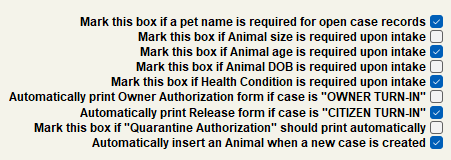
Mark this box if a pet name is required for open case records
- If this check box is selected, Shelter Pro will require a pet name to be entered when a new case is created, or a current case is altered.
Mark this box if Animal size is required upon intake
- If this check box is selected, Shelter Pro will require the animal's Size information (Small, Medium, Large) to be selected when it enters the shelter.
Mark this box if Animal age is required upon intake.
- This option should be marked if you want Shelter Pro to require the animal's Age information (Baby, Adult, Senior) to be selected when it enters the shelter.
Mark this box if Animal DOB is required upon intake.
- This option should be marked if you want Shelter Pro to require the animal's DOB (Date of Birth) to be specified when it enters the shelter.
Mark this box if Health Condition is required upon intake.
- If this check box is selected, Shelter Pro will require the animal's Health Condition (Good, Fair, Poor, Dead on Arrival) to be selected when it enters the shelter.
Automatically print Owner Authorization form if case is "OWNER TURN-IN."
- Most facilities require a signature when an owner brings a pet to a facility. This check box will cause the Owner Authorization form to automatically print when an animal is an "owner turn-in" and the new case is saved. If this option is not selected, you may manually print the form by selecting Print Forms button from the Case View window.
Automatically print release form if case is "CITIZEN TURN-IN."
- Some facilities require a signature when a citizen brings a pet to a facility. The switch will cause the Release Form to automatically print when the animal is a "Citizen Turn-In" and the new case is saved. If this option is not selected, you may manually print the form by selecting the Print Forms button from the Case View window.
Mark this box if "Quarantine Authorization" should print automatically.
- This feature will cause the Quarantine Authorization form to print automatically when an animal is an owner turn in, the status is quarantined, and the new case is saved. If this option is not selected, you may manually print the form by selecting the Print Forms button from the Case View window.
Automatically insert an Animal when a new case is created.
- This switch will cause a new animal record to be created and automatically linked to each new case.
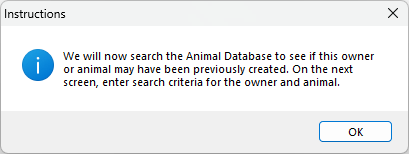
- If this switch is NOT selected, when a "new case" is created, instead of Shelter Pro creating a new animal record, it will prompt the user to search the Animal Database to see if the selected animal or owner already has a previously created record.
Days a Stray dog/cat (with/without collar) is held before Adoption/Euthanization Evaluation
.png)
- Holding days are used to calculate the evaluation due date for a case when its current status is set to Holding. When the evaluation due date has passed, the Evaluation Due Summary will report this animal as due for re-evaluation.
The user can input a day range between 0 and 999 when selecting an Evaluation Due Summary.
Next Topic:
Customize Process
Comment or report problem with topic