
 Donation Reports
Donation Reports
To access the Donation Reports, from the Shelter Pro main menu, select Donations, then Report-Donations. This report generator is used to generate reports on Donation records.
.png)
Important foundation
For an overview of reporting basics, click Report Generators.
This will cover the topics of 'Date Range Reports', 'Status Reports', 'Grouping/Sorting', 'Additional Filters'.
Tip - Short versus Detailed reporting
Many of the reports in the module have a 'short' and a 'detailed' version. You can adjust which version to run depending on the desired outcome of generating a particular report. Additionally, you can select if you want the person's email address, phone number, or donation notes.
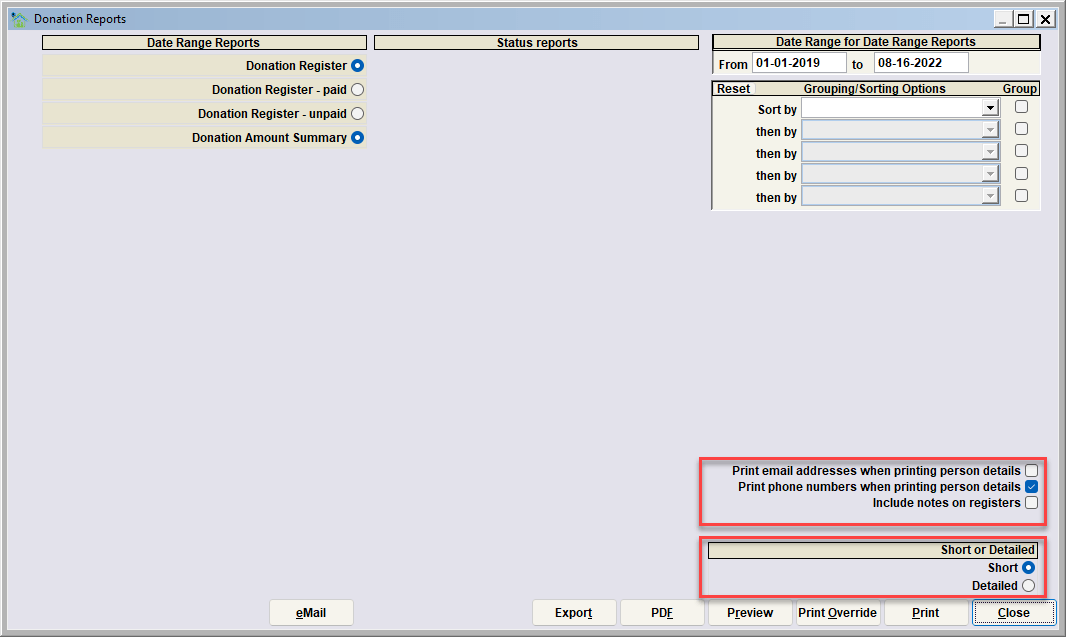
Date Range Reports
.png)
Donation Register
This report lists all donation records where the "donation Date" is within the specified date range.
Donation Register - Paid
This report lists all donation records that are listed as paid within the specified date range.
Donation Register - Unpaid
This report lists all donation records that are listed as unpaid within the specified date range.
Donation Amount Summary
This report lists the donation amount total within the specified date range.
Important foundation
For an overview of reporting basics, click Report Generators.
This will cover the topics of 'Date Range Reports', 'Status Reports', 'Grouping/Sorting', 'Additional Filters'.
Next Topic
Comment or report problem with topic