
 Geocoding
Geocoding
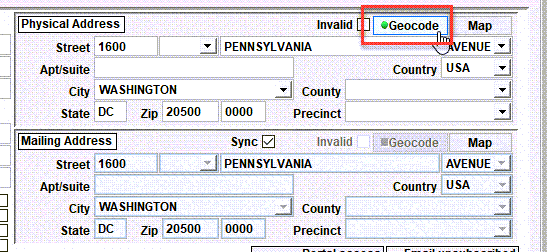
The Geocode button causes an address to be geocoded.
What is Geocoding?
Geocoding is the process of supplementing/correcting an address via a web service. For Shelter Pro, when an address is geocoded the following things will occur:
- The address will be given it latitude/longitude coordinates;
- The street name, street type, city, state, and/or postal code may be self-corrected if the geocoding provider indicates the values to be incorrect;
- The county value may be added or self-corrected if the geocoding provider returns a county value;
- The precinct value may be added or self-corrected if the geocoding provider returns a precinct (or what they call the 'political affiliation') value;
See Geocoding for a before/after example of geocoding an address. Note that Geocoding must be enabled on Shelter Pro. See Customize Addresses for more discussion on getting your Shelter Pro setup with geocoding.
The Geocode button
When the Geocode button is clicked, Shelter Pro will call your geocoding provider with the given address. The provider will return their geocode values for the address. If the values are different, the address will be automatically corrected with the geocoding provider's content.
The Geocode button - when it's green
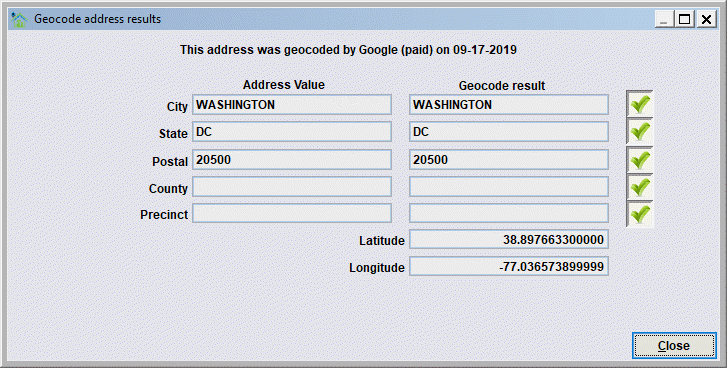
When the Geocode button shows a green dot, it is indicating that the address has been geocoded and the address values match what the geocoding provider returned.
When you click on the geocode button, the geocode results are shown alongside the address values.
The Geocode button - when it's yellow
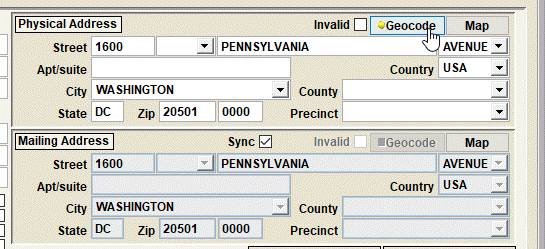
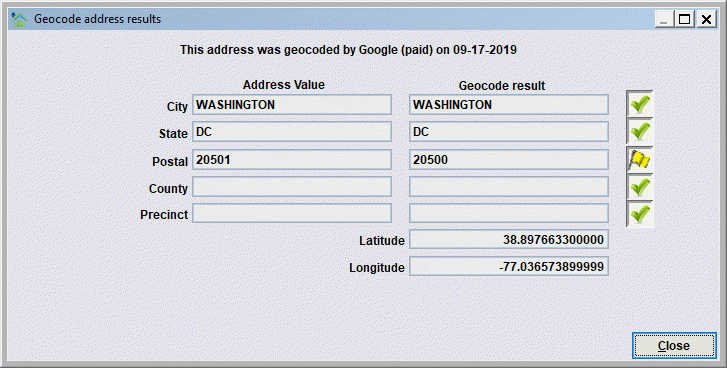
When the Geocode button shows a yellow dot, it is indicating that the address has been geocoded, however one or more of the address values do not match what the geocoding provider returned. Notice how the user-entered zip code does not match what what the geocoding service returned.
The Geocode button - when it's black
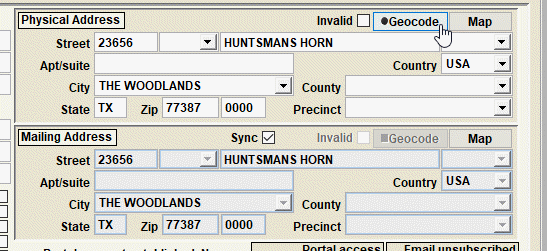
When the Geocode button shows a black dot, it is indicating that the address has not been geocoded. Clicking the button will cause the geocoding service to be called with the address and will result in the address being supplemented/corrected by the service and the button will typically be changed to green indicating the address geocoding has been successfully applied.
Next Topic
Comment or report problem with topic