
 Citation File Cabinet
For an overview of File Cabinets and their usage, click File Cabinets
The Citation File Cabinet is used to retrieve Citation records.
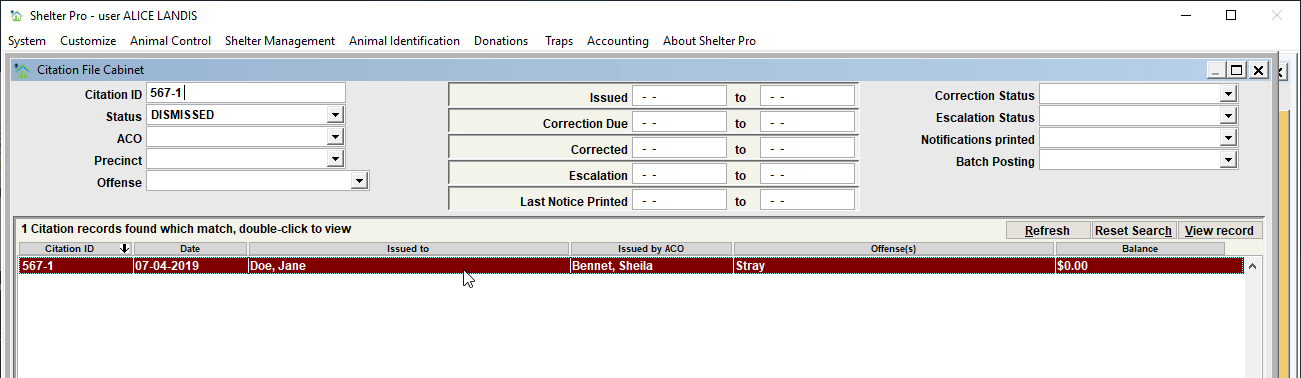
The various search filters include these:
Citation ID
If looking for a particular citation by its tracking number, enter it here.
Status
If looking for citations currently in a particular status (Dismissed, No fine, Not Dismissed, Paid, etc.), choose the targeted status in this selection.
ACO
If looking for citations issued by a particular ACO, choose the ACO in this selection.
Precinct
If looking for citations associated to a particular precinct, choose the targeted precinct in this selection.
Offense
To look up citations for a specific violation, select the violation in the offense dropbox.
Get Results
Click this button if using 'user triggered' refresh after entering filter criteria.
For a discussion on file cabinet refresh behaviors, click My Shelter Pro - Other Items
Reset Search
Click this button to clear the search fields and begin a new search.
Working with the results
Sorting the results
By default, the results will sort by the first column, descending. The results can be re-ordered by simply clicking any of the column headers.Viewing a record
Either double-click the record in the results list, or single-click the record and click 'View record'. Either will cause the record to be loaded and viewed.
Batch Forms
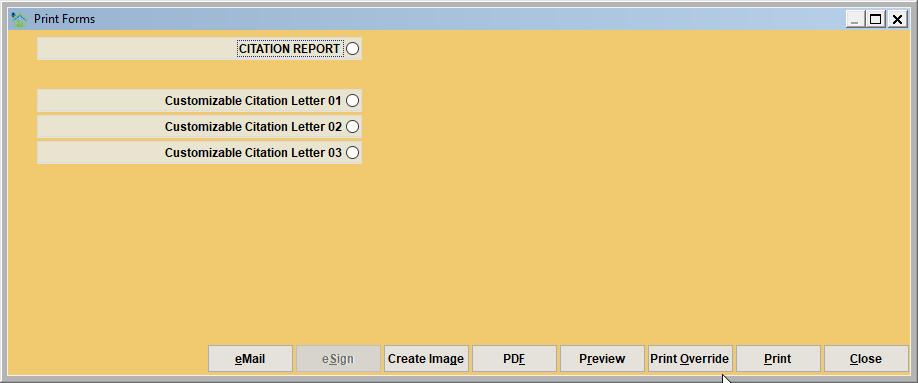
Batch Forms will allow you to print a group of forms, one for each record in the list window. When the button is clicked, you will select the form(s) to be printed, and click the Print (or Preview) button.
Here is a sample of the Citation Forms menu. You would choose the form to be printed for the results from the list.
Tip - The selected forms will print in the same order seen in the File Cabinet view.
Next Topic
Comment or report problem with topic